Online recruitment software
The broad category of web-based tools used to manage hiring, from standalone apps such as applicant trackers, sourcing tools, and video interviewing platforms to all-in-one suites that bundle several modules under one login.
Michal Juhas · Last reviewed May 9, 2026
What is online recruitment software?
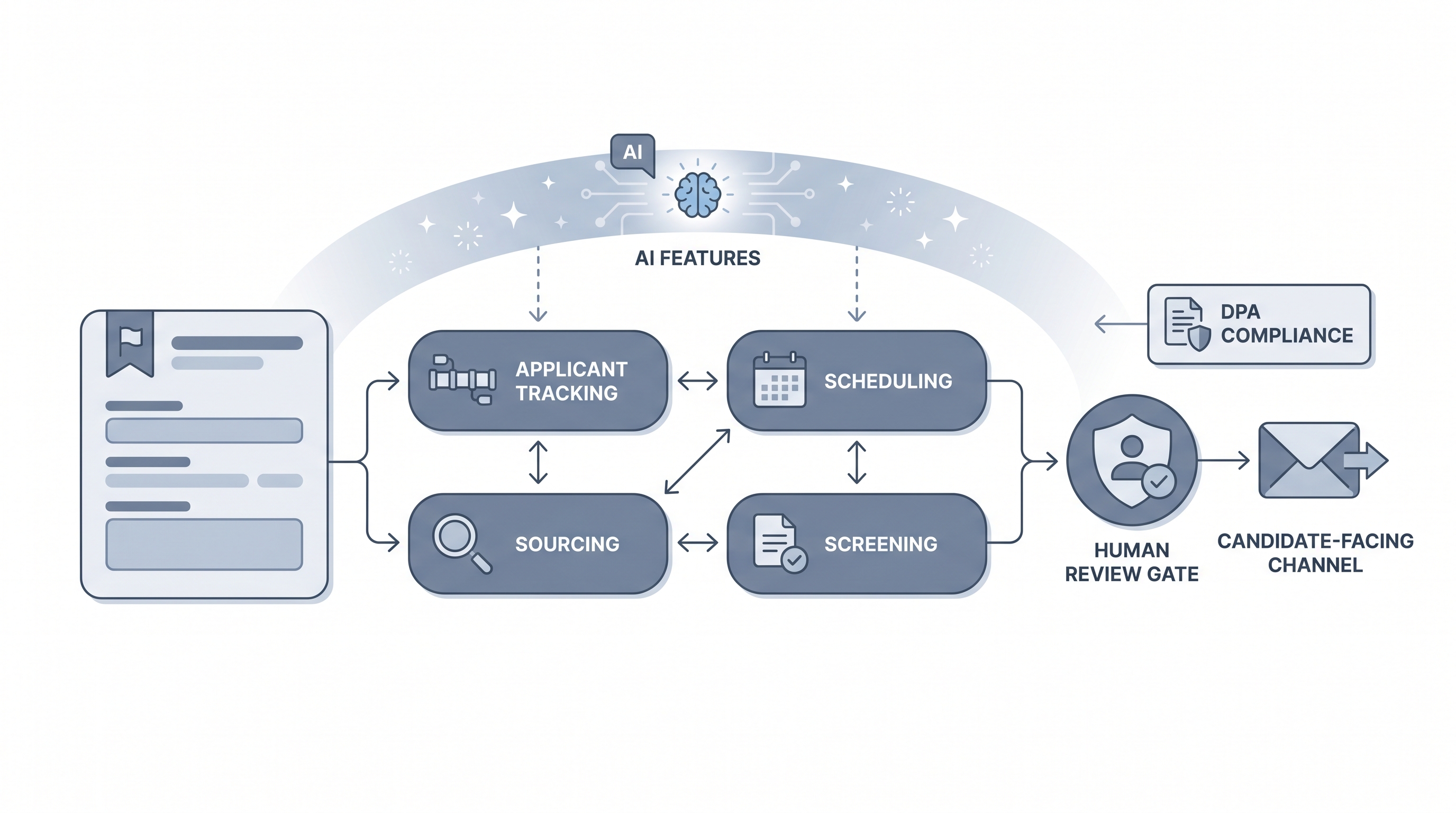
Online recruitment software is a broad category of web-based tools that help companies attract, screen, and hire candidates. The term covers everything from standalone apps (a single sourcing extension, a skills assessment tool, a video interviewing platform) to all-in-one recruitment platforms that bundle applicant tracking, scheduling, and analytics under one login.
Most hiring teams run a mix: a central ATS as the system of record, with one or two specialist tools layered on top for sourcing or screening. The category has expanded alongside AI features: most software vendors now embed some form of job description drafting, resume parsing, or interview summary generation.
In practice
- A 20-person HR team uses a simple ATS for pipeline tracking and adds a separate sourcing tool to reach passive candidates, calling both "recruitment software" even though they come from different vendors and require two logins.
- A TA operations lead might say "our recruitment software doesn't integrate with the HRIS" when they mean one specific tool in the stack. Understanding which tool is the gap is usually the first step in any vendor audit.
- Candidates experience recruitment software as the careers page, the application form, and automated status emails, all powered by systems the recruiter never sees from the candidate side.
Quick read, then how hiring teams use it
This is for recruiters, TA leaders, and HR partners who need shared vocabulary in vendor reviews, tool audits, and budget conversations. Skim the first section for a fast shared picture. Use the second when deciding whether to buy a new tool, consolidate a fragmented stack, or evaluate AI features before enabling them.
Plain-language summary
- What it means for you: Online recruitment software is any web-based tool used in hiring: the system where applications land, the sourcing tool you use to find candidates, the video platform for interviews, and the dashboard where you track the pipeline. Different teams use different tools; many have three or more running at once.
- How you would use it: Log in to review applications, move candidates through stages, schedule interviews, and track which source produced the most qualified candidates.
- How to get started: List every tool your team currently uses in hiring. Map them to the hiring stage they cover. Identify the gaps and the handoff points where data has to be re-entered manually. That map is your starting point for any vendor decision.
- When it is a good time: When your current tools cannot handle the hiring volume, when recruiters spend more than 30 minutes a day re-entering the same candidate data between systems, or when reporting requires a manual spreadsheet every week.
When you are running live reqs and tools
- What it means for you: Recruitment software is not a single thing. What matters for compliance and data governance is which vendor holds personal candidate data, which DPA covers that vendor, and how long records are retained after a rejection. Fragmented stacks multiply that complexity.
- When it is a good time: When sourcing volumes require automation, when compliance reporting is manual, or when interview coordination costs more recruiter time than the interview itself.
- How to use it: Treat your ATS as the system of record. All other tools should sync to it rather than maintain their own candidate records in parallel. Configure scorecard templates per role family, set stage-level ownership, and measure time-to-fill before enabling any AI add-on module.
- How to get started: Before buying, run a discovery sprint: for each tool you are evaluating, ask the vendor for the DPA, the bias audit report (for any AI screening feature), and references from teams at similar headcount. Trial the candidate-facing side, not just the recruiter dashboard.
- What to watch for: AI scoring features that feed automated decisions require bias audit disclosure in several jurisdictions. Automated candidate-facing messages need a human-in-the-loop review gate. Interview recording requires explicit consent. Vendor contracts often auto-renew with price increases; get multi-year rate protection in writing.
Where we talk about this
On AI with Michal live sessions we look at recruitment software decisions as part of the broader hiring tool stack: which category to address first, when a consolidated online recruitment platform is worth the migration overhead, and how to evaluate AI claims before you enable scoring features. The AI in recruiting and sourcing automation tracks both examine which integrations survive production traffic, not only demo day. Start at Sourcing Lab and bring your real stack, volume data, and compliance questions.
Around the web (opinions and rabbit holes)
Third-party creators move fast. Treat these as starting points, not endorsements, and double-check anything before you wire candidate data.
YouTube
- How to choose recruitment software for your team covers criteria-driven selection, common implementation mistakes, and what teams wish they had checked before signing.
- Best recruitment software tools compared walks feature comparisons across ATS, sourcing, and screening categories with real workflow scenarios.
- AI in recruitment software: what to evaluate before buying covers bias audit obligations, data residency questions, and how to ask vendors the right compliance questions.
- Best recruitment software for a startup in r/recruiting contains honest practitioner assessments covering what works at small scale and what gets expensive fast.
- Switching ATS: what I wish I had known in r/humanresources covers migration pain points, data cleanup timelines, and what the demo never shows.
- What recruitment software do agencies actually use in r/RecruitmentAgencies collects agency-specific tool assessments with candid notes on integration and support quality.
Quora
- What is the best online recruitment software? collects practitioner opinions across company sizes and use cases (read critically and weight recent answers more heavily).
Software category versus integrated platform
| Dimension | Online recruitment software (point tools) | Online recruitment platform |
|---|---|---|
| Candidate record | Often split across tools | Single source of truth |
| Integration overhead | Higher: each tool-to-tool connection | Lower within the platform |
| Data processing agreements | Separate DPA per tool | One DPA covering all modules |
| Flexibility | Replace each tool independently | Harder to swap individual modules |
| Cost model | Pay per tool; easier to cancel | Bundled; higher switching cost |
Related on this site
- Glossary: Online recruitment platform, Applicant tracking software, AI recruitment software, Hiring tools, Workflow automation, Human-in-the-loop (HITL), Candidate data enrichment, Resume parsing
- Blog: AI sourcing tools for recruiters
- Live cohort: Sourcing Lab
- Course: Starting with AI: the foundations in recruiting
- Membership: Become a member