Online recruitment tools
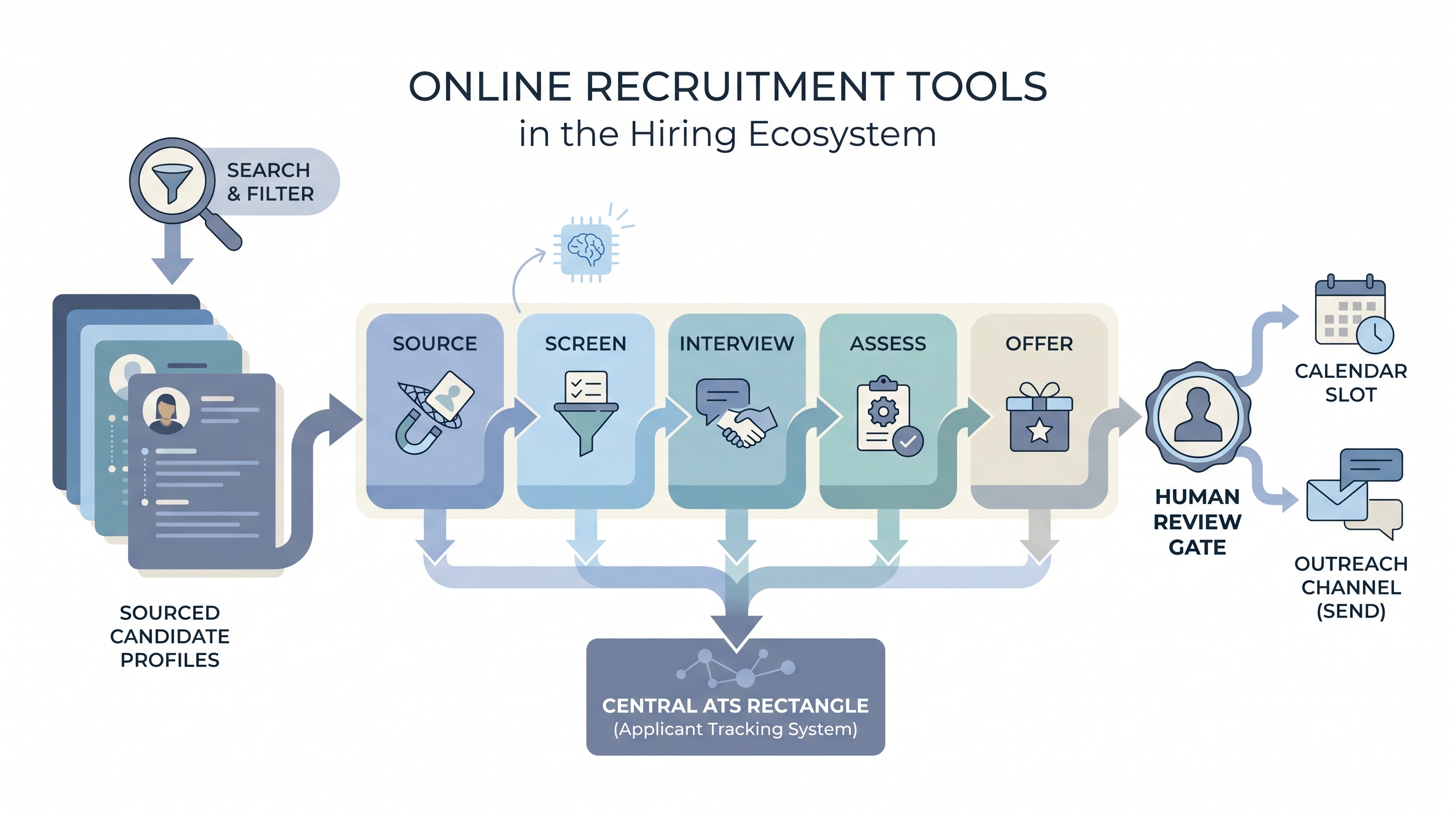
The specific instruments hiring teams use to complete discrete tasks online: a sourcing extension to find passive candidates, an applicant tracker to manage pipeline stages, a scheduling connector to coordinate interviews, and an AI assistant for drafting outreach or summarizing calls.
Michal Juhas · Last reviewed May 9, 2026
What are online recruitment tools?
Online recruitment tools are the specific instruments hiring teams reach for to complete a discrete task: a sourcing extension to find passive candidates, an ATS to track pipeline stages, a scheduling connector to coordinate interviews, or an AI assistant to draft a first-pass job description.
What separates tools from the general label of recruitment software is focus: a tool does one job well. An online recruitment platform bundles several tools under one login and a shared candidate record. Most hiring teams operate with both: a core system of record and a set of point tools layered on top.
In practice
- A sourcer might use a browser extension to export LinkedIn profiles, paste them into an ATS stage, then use an AI assistant to write a personalized outreach message. All three are online recruitment tools even though they come from different vendors and serve different functions.
- A TA ops lead who says "the tool broke" usually means one specific step in a multi-tool workflow stopped working. Diagnosing which tool is the gap is faster once the team has mapped each hiring task to a named instrument.
- Candidates experience online recruitment tools as the apply button, the status email, and the video call link. They never see the ATS stage, the sourcing note, or the AI-generated scorecard summary.
Quick read, then how hiring teams use it
This is for recruiters, TA leaders, and HR partners who need shared vocabulary when evaluating tools, auditing a stack, or deciding whether a new AI feature is worth the risk. Skim the first section for a fast shared picture. Use the second when deciding what to add, replace, or turn off in your current setup.
Plain-language summary
- What it means for you: Online recruitment tools are the apps and extensions your team uses to get candidates from sourced to hired. Each tool covers a specific hiring task: finding people, moving them through stages, assessing skills, scheduling interviews, or drafting communication.
- How you would use it: Open the right tool for the task you are doing right now, complete that step, and pass the output to the next tool or stage. Resist the urge to run every tool simultaneously; each one you add requires someone to own the vendor relationship and the data it stores.
- How to get started: Write down every hiring task your team repeats weekly. Next to each, write the current tool or workaround. That map shows where gaps are and which tools to evaluate first.
- When it is a good time: When a manual step is slowing a specific hire, when a recruiter is re-entering the same data in two systems, or when a compliance audit reveals a gap in documentation.
When you are running live reqs and tools
- What it means for you: Each tool in your stack is a data processor. Adding a new tool without checking the DPA creates a compliance gap that can surface months later in a data subject access request or an audit.
- When it is a good time: After the hiring process is documented and the owners of each stage are clear. Tools amplify what is already working; they rarely fix a process that is undefined.
- How to use it: Treat the ATS as the single source of truth. All other tools (sourcing, assessment, scheduling, AI drafting) should sync back to it. Enable AI features one at a time, log which version is running, and keep a human-in-the-loop gate before anything reaches a candidate.
- How to get started: Run a 30-minute tool audit: for each tool in the stack, name the owner, the DPA status, the data it stores, and when records are deleted. This audit often reveals tools that are paid for but unused, or tools that store candidate data without a signed agreement.
- What to watch for: AI scoring features that operate without human review, sourcing tools that scrape contact data without GDPR lawful basis, and scheduling tools that store recordings beyond what your policy allows. Vendor contracts often auto-renew; set calendar reminders 60 days before each renewal.
Where we talk about this
On AI with Michal live sessions we build tool audits and stack maps as a shared exercise. Sourcing automation blocks cover which tools survive real API limits and privacy requirements. AI in recruiting blocks connect tool decisions to hiring manager trust and GDPR obligations. If you want the full room conversation, not just this page, start at Sourcing Lab and bring your actual tool list.
Around the web (opinions and rabbit holes)
Third-party creators move fast. Treat these as starting points, not endorsements, and double-check anything before you wire candidate data.
YouTube
- How to Build a Recruitment Tech Stack covers tool-by-tool stack building with integration and handoff considerations.
- Best Recruitment Tools for Sourcers includes practitioner reviews of sourcing extensions and enrichment tools with real workflow demonstrations.
- AI Tools for Recruiting Explained covers the risk tiers of AI recruiting tools and what bias audit requirements look like in practice.
- What tools do you use for sourcing? in r/recruiting collects practitioner tool preferences with honest notes on cost and learning curve.
- Tool stack for a small TA team in r/humanresources shows what small teams actually run versus what enterprise vendors sell them.
- AI tools in recruiting: what is actually worth it in r/recruiting contains candid assessments of AI recruiting tools from practitioners testing them in production.
Quora
- What are the best online recruitment tools? collects opinions from recruiters, TA leaders, and HR practitioners on tool selection criteria (read critically and weight recent answers more heavily).
Point tool versus platform
| Dimension | Online recruitment tools (point tools) | Online recruitment platform |
|---|---|---|
| Scope | Single hiring task per tool | Multiple tasks under one login |
| Candidate record | Distributed across tools | Unified in one system |
| Integration burden | Each tool needs its own connection | Lower within the platform boundary |
| Compliance paperwork | Separate DPA per tool | One DPA for the full suite |
| Flexibility | Replace each tool independently | Harder to swap individual modules |
Related on this site
- Glossary: Online recruitment platform, Online recruitment software, Applicant tracking software, AI recruiting tools, Hiring tools, Human-in-the-loop (HITL), Workflow automation, Candidate data enrichment
- Blog: AI sourcing tools for recruiters
- Live cohort: Sourcing Lab
- Course: Starting with AI: the foundations in recruiting
- Membership: Become a member