Recruitment AI software
Software that uses AI (language models, ranking models, or semantic search) to assist one or more stages of the pre-hire process: sourcing, screening, outreach drafting, interview scheduling, or pipeline analytics.
Michal Juhas · Last reviewed May 9, 2026
What is recruitment AI software?
Recruitment AI software is a broad category label for any software product that uses AI to assist one or more stages of the pre-hire process: sourcing candidate profiles, screening applications, drafting outreach, scheduling interviews, summarizing notes, or reporting on pipeline health. The category spans standalone point solutions (a sourcing tool with semantic search, a scheduling assistant) and full-platform suites that layer AI across every stage in one connected product.
The AI inside each product varies. Most current recruitment software combines large language models for generative tasks (drafting, summarizing), ranking or matching models for scoring candidates against job descriptions, and semantic search for retrieving profiles by meaning rather than exact keyword. A vendor that labels all three as "AI" is technically accurate but not particularly informative. The questions that matter: which specific feature uses which technique, what training data it used, and whether AI output is logged for audit when a candidate or regulator asks.
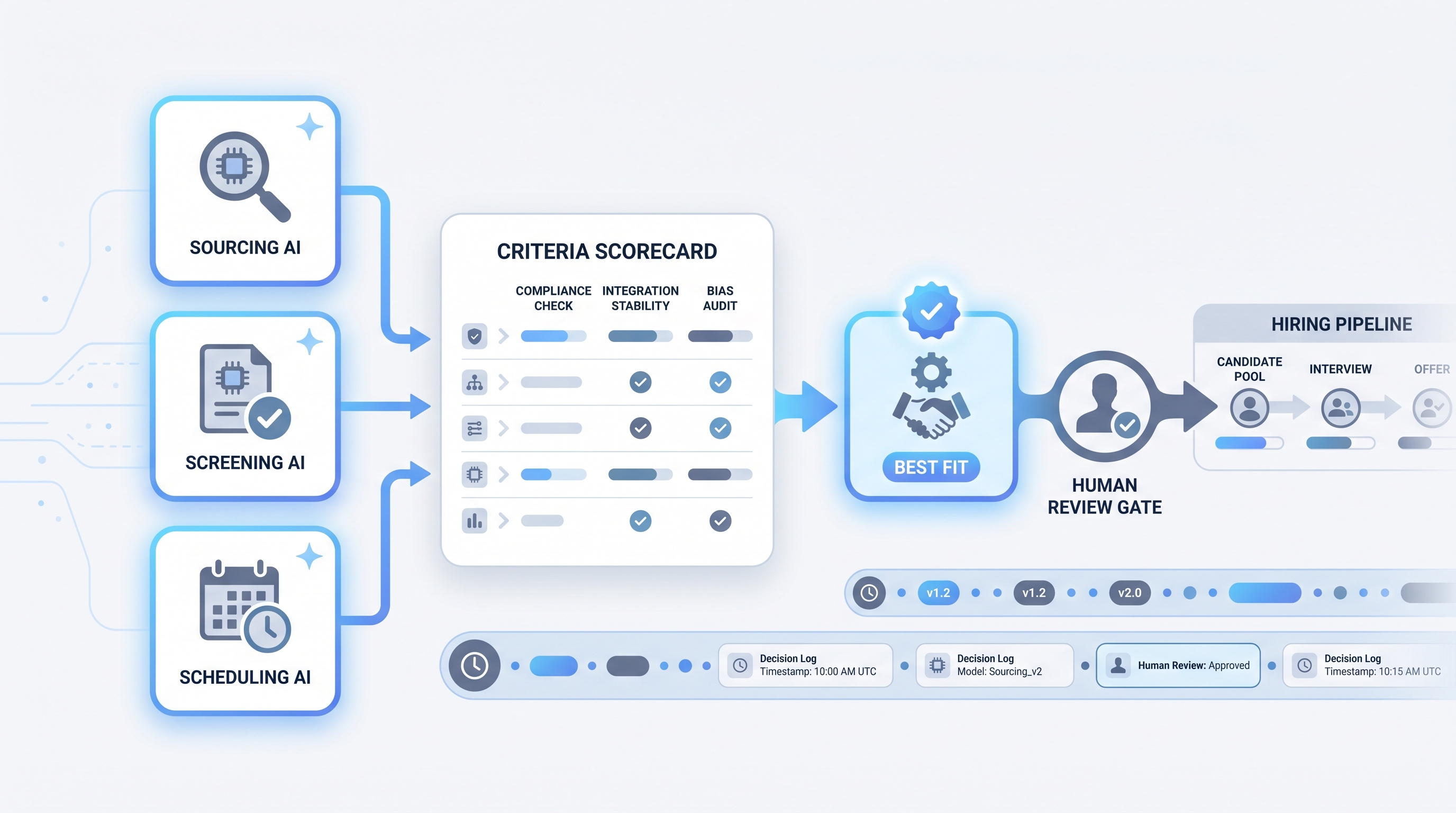
In practice
- A TA lead at a 500-person company describes her stack as three separate tools: one for resume screening, one for outreach personalization, and one for interview scheduling, all connected to the ATS through API integrations. "We did not buy a platform," she says. "We bought three point solutions we had to wire together ourselves."
- A sourcer at a high-growth startup treats recruitment AI software the same way he treats Boolean search: as a filter that surfaces candidates he still has to evaluate, not as a decision-maker. "The AI shortlist is the starting point, not the answer."
- In TA ops conversations, the term comes up most often when distinguishing AI features baked into an existing ATS from standalone AI tools bought to fill a gap the ATS does not cover, or when comparing vendor claims during an RFP.
Quick read, then how hiring teams use it
This is for recruiters, sourcers, TA, and HR partners who need the same vocabulary in debrief meetings, vendor calls, and budget reviews. Skim the first section when you need a shared picture fast. Use the second when you are deciding how to wire a specific product into your ATS or compliance workflow.
Plain-language summary
- What it means for you: A category of software products that use AI to do some of the repetitive cognitive work in hiring, like sorting resumes, drafting messages, or suggesting times. Not one product, not magic.
- How you would use it: Pick the specific bottleneck (too many resumes to read, too much time scheduling, too slow to draft personalized outreach) and find the product that addresses that one thing well before adding another.
- How to get started: Define the success metric for the bottleneck before you start a trial. If time-to-first-screen is twelve days, aim to cut it to seven. If you cannot agree on the metric, the trial will not produce a useful answer.
- When it is a good time: When the same recruiter task happens more than fifty times a week, when the team is growing faster than it can hire ops support, or when a measurable delay is costing offers.
When you are running live reqs and tools
- What it means for you: Recruitment AI software changes states in systems (rankings, outreach queues, stage moves) and not just text in a chat window. That distinction matters for audit trails, error handling, and who is responsible when a candidate asks why they were screened out.
- When it is a good time: After you have a documented human review gate in place for any candidate-facing output or ranking decision. Do not connect AI output directly to ATS stage moves without a named reviewer in the loop.
- How to use it: Match the tool to the task: ranking models for high-volume screening, LLMs for drafting and summarizing, semantic search for talent pool retrieval. Confirm your ATS integration is stable, not on the vendor roadmap. See AI recruiting tools for a stage-by-stage breakdown.
- How to get started: Before signing a contract, ask for a bias audit report, a data processing agreement, and a reference call with a team at your volume and job type. Run a thirty-day pilot before renewing. Log which model version processed which batch so you can answer questions six months later.
- What to watch for: Model drift when your job mix shifts, integration breaks after ATS updates, prompt changes pushed silently by vendor releases, and AI output the team stops trusting because it was never calibrated. Plan alerts the same way you plan the happy path.
Where we talk about this
On AI with Michal live sessions, recruitment AI software comes up as a category context in both tracks. The AI in recruiting block covers how to evaluate vendor claims, ask the right questions in demos, and wire a human-in-the-loop review gate before AI outputs affect candidates. The sourcing automation block goes deeper on the integration layer: API stability, webhook reliability, and GDPR data flows for AI-assisted sourcing. Start at Sourcing Lab if you want the room conversation with real practitioners comparing notes on actual tools rather than a vendor walkthrough.
Around the web (opinions and rabbit holes)
Third-party creators move fast. Treat these as starting points, not endorsements, and double-check anything before you wire candidate data to a new platform.
YouTube
- Search "AI recruiting software demo" to watch vendor walkthroughs. Pay attention to the review step: any demo where AI output flows directly to candidates without a visible approval gate is showing you a risk, not a feature.
- Search "AI hiring tool bias audit" for practitioner and researcher videos on adverse impact in algorithmic screening. Academic researchers have produced accessible video content on this topic that predates vendor marketing.
- Search "ATS AI features versus standalone AI recruiting tools" for comparison content that helps TA buyers frame the build-versus-buy or embedded-versus-point-solution decision.
- Search "AI recruiting software worth it" in r/recruiting and r/TalentAcquisition for the honest post-deployment views you will not find in vendor case studies.
- How do you evaluate AI features in your ATS? in r/TalentAcquisition is where TA ops practitioners share real RFP criteria and post-deployment lessons.
- Search "AI resume screening bias" in r/recruiting for the compliance perspective from practitioners who have encountered problems, not from vendors who claim to have solved them.
Quora
- What should I look for in AI recruiting software? collects practitioner and vendor answers on evaluation criteria (quality varies; vendor perspectives are common, read critically).
Point solution versus integrated platform
| Dimension | Point solution | Integrated AI platform |
|---|---|---|
| Deployment speed | Fast for one use case | Slower; full onboarding required |
| Integration work | You handle ATS wiring | Vendor handles (when stable) |
| Vendor lock-in | Low; swap one tool | High; candidate data lives in platform |
| Bias audit surface | Per-tool, contained | Harder when AI spans all stages |
| Cost at scale | Adds up across tools | Often predictable per-seat pricing |
Related on this site
- Glossary: AI recruiting tools, AI recruitment platform, AI hiring software, AI in recruiting, Adverse impact, Human-in-the-loop (HITL), Semantic search, Large language model
- Blog: AI sourcing tools for recruiters
- Guides: Sourcers
- Live cohort: Sourcing Lab
- Membership: Become a member