Employee recruitment software
A category of tools that manages the full process of finding, attracting, screening, and hiring employees, from job posting and applicant tracking through offer management, with modern platforms increasingly embedding AI for sourcing, resume scoring, and communication drafts.
Michal Juhas · Last reviewed May 10, 2026
What is employee recruitment software?
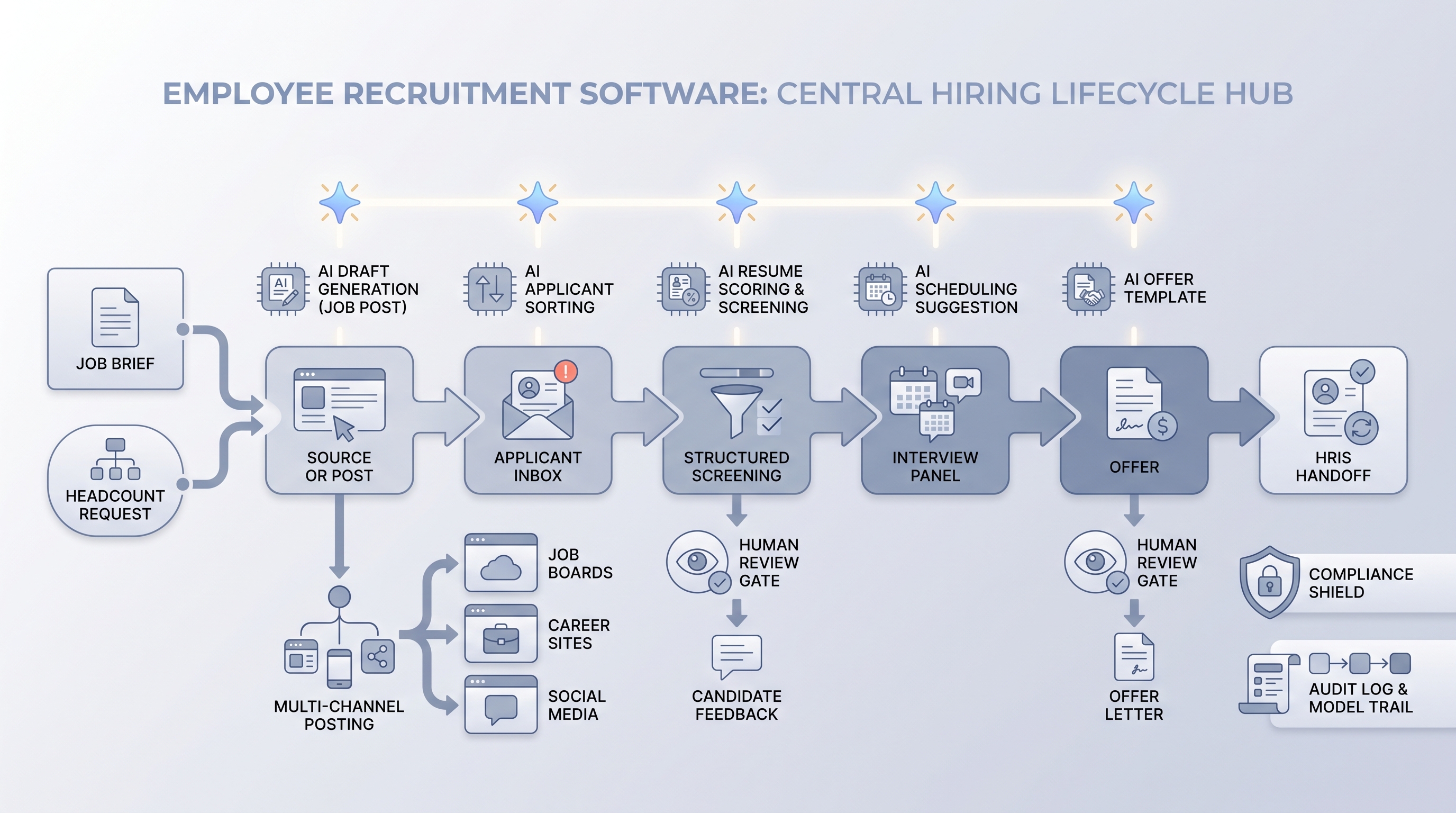
Employee recruitment software is the general name for tools that manage hiring from the moment a role is approved through the day a candidate signs an offer. The category includes everything from multi-board job posting and applicant tracking to interview scheduling, structured scorecards, offer management, and the hand-off to payroll or an HRIS when someone joins.
The term shows up most often when the person searching is an HR generalist, an operations lead, or a business owner who needs a complete hiring solution without a dedicated talent acquisition team. Vendors sell the same product under multiple names: ATS, hiring platform, recruitment platform, and employee recruitment software. The difference is mostly who is asking and what they expect the tool to cover.
Modern platforms increasingly embed AI across the hiring lifecycle: drafting job descriptions from intake notes, surfacing candidates from external databases, scoring resumes against a structured scorecard, and generating outreach sequences. These features accelerate the process but each one carries its own audit and compliance obligation.
In practice
- When a 40-person company signs up for a hiring tool so the operations manager can post to LinkedIn and Indeed from one place, manage the application inbox, and hand the hire off to their HRIS without re-entering data, that is employee recruitment software in the most common use case.
- In AI Sourcing Lab sessions, the question "what recruiting software do you use?" almost always surfaces this term first, before teams get into ATS-specific vocabulary. It is the entry point for most organizations building a hiring process.
- A TA leader at a scaling startup described it as: "We called everything our ATS until we needed it to do offer management and onboarding handoffs. That is when we realized we needed actual recruitment software, not just a pipeline tracker."
Quick read, then how hiring teams use it
This is for HR professionals, team leads, and operations managers who need the same vocabulary when evaluating vendors, configuring workflows, and reporting to leadership. Skim the first section for a shared picture. Use the second when you are mid-evaluation or setting up a new platform.
Plain-language summary
- What it means for you: Employee recruitment software is the single system where job reqs live, applicants collect, interviewers leave feedback, and offers get sent, so every stakeholder sees the same pipeline instead of separate inboxes and spreadsheets.
- How you would use it: You open a req, post to job boards, review applications inside the tool, schedule interviews, collect structured feedback, send an offer, and trigger the HRIS handoff, all without switching systems.
- How to get started: Map the five or six handoffs where hiring information currently gets lost (the req in a spreadsheet, feedback in email, offer in a Word doc). Find the tool that closes those specific gaps rather than the one with the longest feature list.
- When it is a good time: Before a hiring push, when onboarding a new HR person who needs a documented process to follow, or after a mis-hire traced back to feedback that never made it into a shared system.
When you are running live reqs and tools
- What it means for you: The platform is where process governance lives: who can advance a candidate to an offer, which scorecards attach to which roles, and which hiring events trigger downstream notifications to IT or payroll.
- When it is a good time: When the same workflow runs across multiple reqs and the cost of inconsistency (delayed hires, missed feedback, unclosed roles) exceeds the effort of configuring the platform properly.
- How to use it: Set stage-by-stage permissions before you go live. Test edge cases (declined offers, rescheduled panels, withdrawn candidates) in a sandbox before a live req depends on the integration. Confirm that any AI scoring feature logs model version and criteria so a GDPR or bias question has a documented answer.
- How to get started: Demo with your actual job types and a sample pipeline of 15 candidates, not the vendor showcase. Map your current source-of-hire tracking and verify the new system preserves it without a manual export. See ATS API integration for what a stable integration layer looks like.
- What to watch for: Data migration gaps that break reporting for months after launch, AI ranking features with no audit trail, permission creep that exposes candidate data to the wrong hiring managers, and retention defaults that store EU candidate data longer than your DPA allows.
Where we talk about this
On AI with Michal live sessions, employee recruitment software shows up in both the AI in recruiting and sourcing automation tracks. The first covers how AI features sit inside or alongside these platforms, which ones to trust in production, and how to build a review habit before AI recommendations reach candidates. The second covers how automation connects hiring events to downstream systems without creating data gaps. Start at Sourcing Lab and bring your current tool stack, the roles you hire most often, and the two reporting questions you cannot currently answer without exporting to a spreadsheet.
Around the web (opinions and rabbit holes)
Third-party creators move fast and tooling changes monthly. Treat these as starting points, not endorsements, and verify anything before you connect candidate data.
YouTube
- Search "employee recruitment software review" filtered to the last 12 months for practitioner walkthroughs from HR leads comparing platforms at different company sizes. Vendor-produced content tends to skip integration failure modes; independent recruiter channels are more candid.
- Search "ATS setup for small business" for hands-on configuration walkthroughs that show what the onboarding process actually looks like before a vendor rep is involved.
- r/humanresources has recurring threads on ATS and hiring software decisions, often from HR generalists evaluating their first real platform rather than TA specialists.
- r/recruiting includes practical conversations about software configuration pain points and contract surprises that vendor demos do not surface.
Quora
- What is the best recruitment software for small businesses? collects practitioner answers across company sizes; the implementation time estimates are often more realistic than vendor documentation.
Employee recruitment software vs ATS vs hiring platform
| Capability | Entry-level recruitment software | Full ATS | Hiring platform with AI |
|---|---|---|---|
| Multi-board job posting | Core | Usually included | Usually included |
| Applicant pipeline and stage tracking | Core | Core | Core |
| Structured scorecards and feedback | Sometimes basic | Usually included | Usually included |
| AI resume scoring or sourcing | Rarely | Varies by vendor | Usually embedded |
| Offer management and e-signature | Sometimes | Varies | Usually included |
| HRIS handoff at hire | Basic or manual | Integration-dependent | Often native |
| Audit trail for AI decisions | Rarely | Varies | Varies, ask explicitly |
Related on this site
- Glossary: Applicant tracking software, Recruitment management software, Hiring software, Hiring platforms, AI hiring software, AI in recruiting, Human-in-the-loop (HITL), AI bias audit, Recruitment analytics software, Time-to-fill
- Blog: AI sourcing tools for recruiters
- Live cohort: Sourcing Lab
- Membership: Become a member