Recruitment tracking software
Software that records and monitors every candidate, requisition, and hiring decision in one shared view, giving teams a consistent pipeline record and the audit trail compliance requires.
Michal Juhas · Last reviewed May 9, 2026
What is recruitment tracking software?
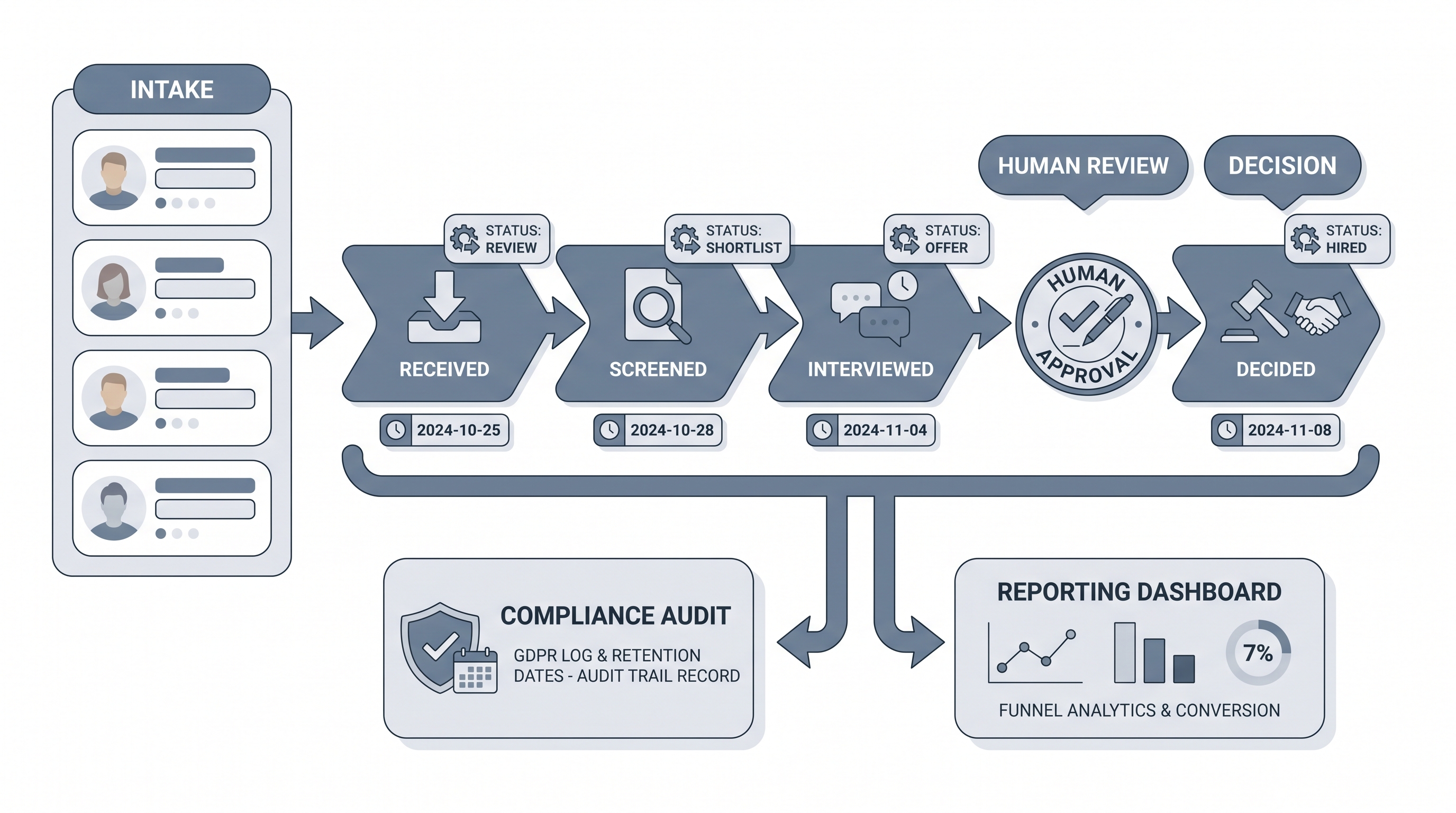
Recruitment tracking software is the system a hiring team uses to record and monitor every candidate, requisition, and hiring decision. It is the shared pipeline of record: the view that tells a recruiter where each candidate stands right now, which stage they moved through last, and what the next action is.
Most teams access this through an applicant tracking system, but the tracking layer inside it is what matters in practice. That layer is the stage logic, disposition codes, timestamps, and audit trail that record what happened to each candidate and why. When tracking breaks, reporting and compliance break at the same time.
In practice
- When a recruiter answers a hiring manager's status question from memory rather than from the ATS, the tracking software is already failing. Teams that trust the pipeline view depend entirely on disposition codes and timestamp accuracy being maintained after every interaction.
- In AI Sourcing Lab sessions, the phrase "the pipeline is a mess" almost always means stage names are duplicated, disposition codes are blank, or two candidates with the same name exist in different reqs with no merge date. These are tracking failures, not software failures.
- A TA ops lead at a 300-person scale-up described their tracking reboot as "the day we stopped treating the ATS as a filing cabinet and started treating it as the legal record. We found candidates who had been in screening for four months with no note and no owner."
Quick read, then how hiring teams use it
This is for recruiters, sourcers, TA, and HR partners who need the same vocabulary in vendor calls, compliance reviews, and pipeline debriefs. Skim the first section for the shared picture. Use the second when you are deciding how tracking shows up in your ATS, integrations, or reporting.
Plain-language summary
- What it means for you: Recruitment tracking software is the system that knows where every candidate is in the hiring process, who is responsible for the next step, and how long each stage has taken. It is the shared scoreboard the whole team reads from.
- How you would use it: You update it after every candidate interaction: moving them to a new stage, adding a note, logging a disposition code when they exit. The accuracy of your reporting is only as good as how consistently the team does this.
- How to get started: Map your real stages on paper before touching the software. Name the dispositions. Agree on who owns each stage move. Then configure the system to match, not the other way around.
- When it is a good time: When a recruiter has to check two or three places to answer a question about a single candidate, that is the signal to fix the tracking setup.
When you are running live reqs and tools
- What it means for you: Tracking software is the audit trail between your sourcing work and your compliance obligations. Every stage move, timestamp, and disposition code is evidence that a fair and documented process ran.
- When it is a good time: Before you add AI scoring, AI tagging, or automated stage moves to your pipeline. If the base tracking is inaccurate, automation amplifies the problem into every downstream report.
- How to use it: Keep one candidate record per person across all reqs. Merge duplicates before a campaign runs, not after. Log disposition codes at every exit point. Treat the recruiter notes field as a legal document, not a scratchpad.
- How to get started: Run a one-req audit: pull all candidates from the last closed role, check that every stage change has a timestamp and an owner, and count how many dispositions are blank. That number tells you what to fix first.
- What to watch for: Configuration drift, where stages get added as workarounds and the original stage logic no longer reflects how the team works. Audit stage names and disposition codes every quarter. Dead stages create dark data that skews funnel conversion reporting.
Where we talk about this
On AI with Michal live sessions, recruitment tracking shows up across both the AI in recruiting and sourcing automation tracks: the first covers how AI layers sit inside or alongside tracking systems, the second covers how automations connect hiring events to downstream systems without creating data gaps. Start at Sourcing Lab and bring your vendor name, your current stage list, and the top reporting question you cannot currently answer without a spreadsheet.
Around the web (opinions and rabbit holes)
Third-party creators move fast and tooling changes monthly. Treat these as starting points, not endorsements, and check anything before you connect candidate data.
YouTube
- Search "ATS setup and configuration" on YouTube for practitioner walkthroughs showing real stage logic and disposition code decisions. Filter by upload date: this space moves quickly enough that a two-year-old review may describe a product that has since been acquired or repriced.
- Search "candidate tracking best practices recruiting" for process-focused content from independent TA ops practitioners. These tend to be more candid about integration failures than vendor-produced tutorials.
- r/recruiting has recurring threads on ATS choices and pipeline setup pain points, often surfacing real configuration gotchas vendors do not mention in demos.
- r/TalentAcquisition includes TA leader conversations about platform migrations, disposition code standards, and what teams wish they had tested before signing a contract.
Quora
- What is the best recruitment tracking software? collects practitioner answers across company sizes; the implementation time estimates tend to be more realistic than vendor documentation.
Recruitment tracking software versus ATS versus talent CRM
| Capability | Tracking layer | Full ATS product | Talent CRM |
|---|---|---|---|
| Candidate stage and disposition tracking | Core | Included | Not primary |
| Timestamps and audit trail | Core | Usually included | Limited |
| Job posting and career page | Not primary | Core | Not typical |
| Passive candidate nurturing | Not typical | Varies by vendor | Core |
| GDPR deletion and suppression | Required | Varies by vendor | Required |
Related on this site
- Glossary: Applicant tracking software, Hiring management software, Recruitment management software, Pipeline coverage reporting, Time to fill, Recruiting stage SLA metrics, Hiring funnel conversion rates, Human-in-the-loop (HITL)
- Blog: AI sourcing tools for recruiters
- Tools: Best recruitment tools, Best recruiting software
- Live cohort: Sourcing Lab
- Membership: Become a member