Top AI recruiting tools
The category of software products that use machine learning or large language models to accelerate specific recruiting tasks - sourcing, outreach drafting, resume screening, interview scheduling, and pipeline analytics - and are most frequently evaluated by TA teams building or upgrading an AI-assisted hiring stack.
Michal Juhas · Last reviewed May 15, 2026
What are the top AI recruiting tools?
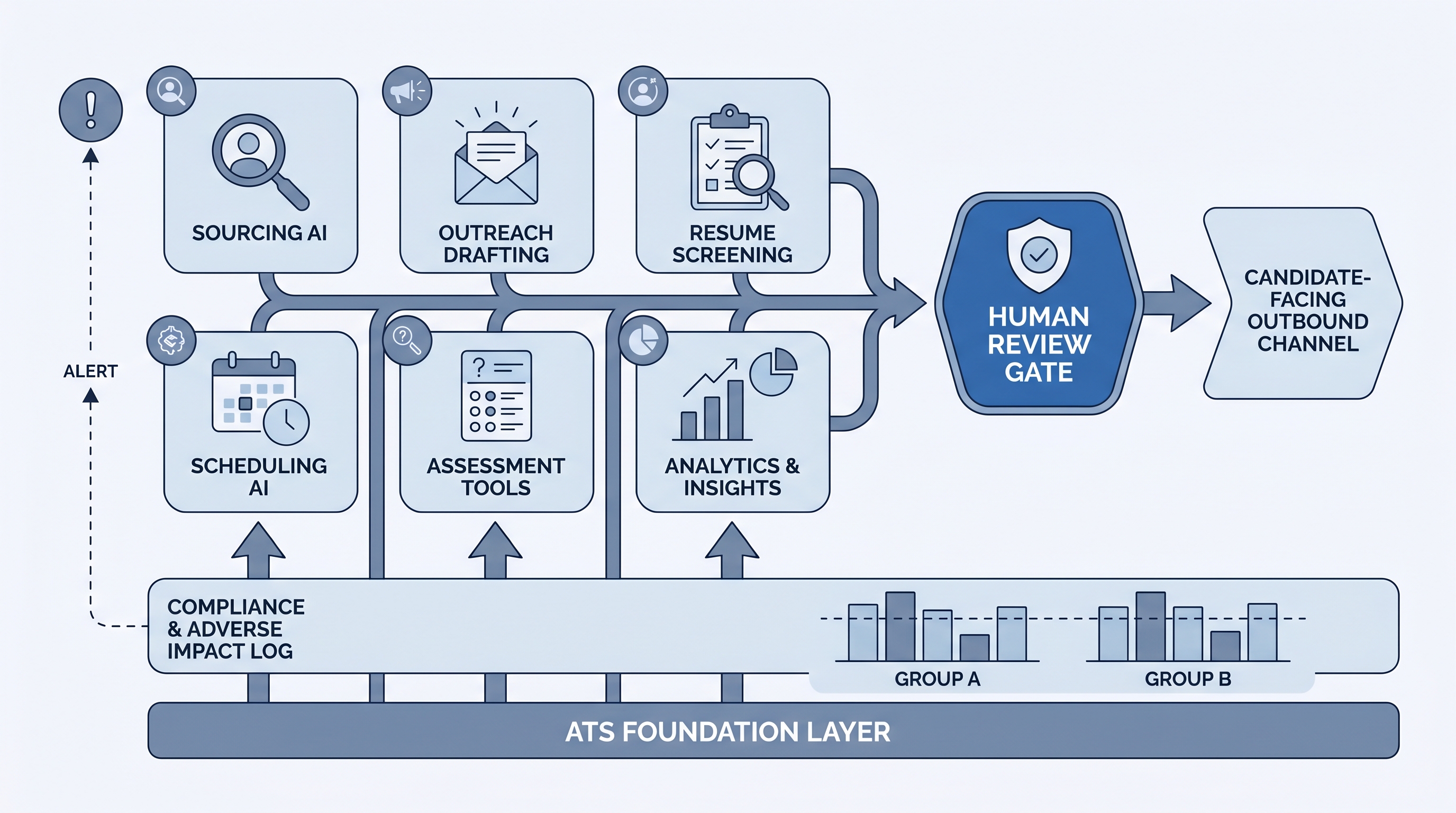
Top AI recruiting tools is the category of software that uses machine learning or large language models to accelerate specific phases of the hiring process. In practice this means sourcing platforms that surface passive candidates without manual Boolean strings, drafting assistants that personalize outreach messages at scale, screening tools that parse CVs and fill evaluation fields, and analytics copilots that surface pipeline data before the weekly standup.
The list shifts every quarter as product roadmaps update. Evaluating by category and compliance posture is more durable than following any published ranking.
In practice
- A sourcing team using an AI platform describes it as "Boolean on steroids" because the tool takes a plain-language brief and returns a ranked shortlist, skipping the keyword iteration step that used to take an hour.
- A TA ops lead might say "our outreach tool drafts the first message but we always read it before sending" - that human gate is what keeps the AI tool from becoming a liability when a template goes stale.
- In debrief calls, teams consistently rank scheduling AI and pipeline analytics as the fastest wins because they reduce coordinator overhead without touching candidate-facing decisions.
Quick read, then how hiring teams use it
This is for recruiters, sourcers, TA ops, and HR partners who need a shared vocabulary for tool evaluations, vendor calls, and compliance reviews. Skim the first section for a fast shared picture. Use the second when you are comparing tools against your actual workflow.
Plain-language summary
- What it means for you: AI recruiting tools are software that handles parts of sourcing, screening, outreach, or scheduling that you used to do manually, so you can spend time on the decisions that require judgment.
- How you would use it: Pick the stage where manual work is highest, find a tool that covers that gap and integrates with your ATS, then pilot it on one requisition before enabling at scale.
- How to get started: Map your current process bottleneck. If the problem is finding candidates, start with sourcing AI. If the problem is screening consistency, start with a structured scorecard and AI parsing. Only then evaluate tools that solve that specific gap.
- When it is a good time: After you have a stable job description process and a human review gate, not before. AI tools multiply whatever is already in your workflow, good or broken.
When you are running live reqs and tools
- What it means for you: AI tools make implicit ranking decisions. You need to log which model version ran, what prompt it used, and who reviewed the output before a candidate advanced or was rejected. That log is your audit trail.
- When it is a good time: After at least one role has been piloted with manual review of every AI output, pass rates have been checked by demographic group, and your ATS integration has been confirmed to write back correctly.
- How to use it: Run sourcing AI and outreach drafting tools with a review queue, not direct send. Run screening AI with a named human reviewer for edge cases. Check your AI bias audit results quarterly and document findings.
- How to get started: Ask your vendor for a data processing agreement before signing. Confirm which AI model powers each feature and request a 90-day change notice when the model updates. See AI recruiting tools for a full category breakdown.
- What to watch for: Prompt drift, silent ranking changes after a model update, candidate data enrichment that does not delete on request, and pass-rate gaps that appear after a new screening feature is enabled without a bias check.
Where we talk about this
On AI with Michal live sessions we walk through tool stacks slowly: the AI in recruiting track covers the category landscape, compliance obligations, and what to ask vendors in an evaluation call. The sourcing automation track goes deeper on sourcing and outreach AI with real ATS payloads. Both tracks run debriefs where participants share which tools held up in production and which failed after the first month. Start at Sourcing Lab and bring your vendor shortlist.
Around the web (opinions and rabbit holes)
Third-party creators move fast. Treat these as starting points, not endorsements, and verify anything before wiring candidate data.
YouTube
- AI Recruiting Tools That Actually Work in 2025 - search this phrase on YouTube for current practitioner walkthroughs across sourcing, screening, and outreach platforms.
- How to Use AI in Recruiting - practical workflow videos from sourcers and TA ops teams showing real configuration steps.
- r/recruiting threads on AI tools give honest assessments from practitioners who have run them on real reqs, not just demo environments.
- r/RecruitmentAgencies covers the agency stack and fee-desk perspective on AI tools that affect candidate ownership and compliance.
Quora
- What AI tools do recruiters use? collects a wide range of practitioner answers across experience levels (read critically, quality varies).
AI tools versus traditional recruiting tools
| Category | Traditional approach | AI-assisted approach |
|---|---|---|
| Sourcing | Boolean string in LinkedIn Recruiter | Semantic search from plain-language brief |
| Outreach drafting | Template library with manual edit | AI draft from job + candidate context |
| Resume screening | Manual CV read | AI parsing into scorecard fields |
| Scheduling | Email back-and-forth | Self-serve link with calendar sync |
| Analytics | ATS report export | Pipeline copilot surfacing stage alerts |
Related on this site
- Glossary: AI recruiting tools, AI sourcing tools, AI hiring tools, AI tools for recruitment, human-in-the-loop, AI bias audit, semantic search, scorecard
- Blog: AI sourcing tools for recruiters
- Tools: ChatGPT, Claude
- Live cohort: Sourcing Lab
- Course: Starting with AI: the foundations in recruiting
- Membership: Become a member