Candidate pipeline health
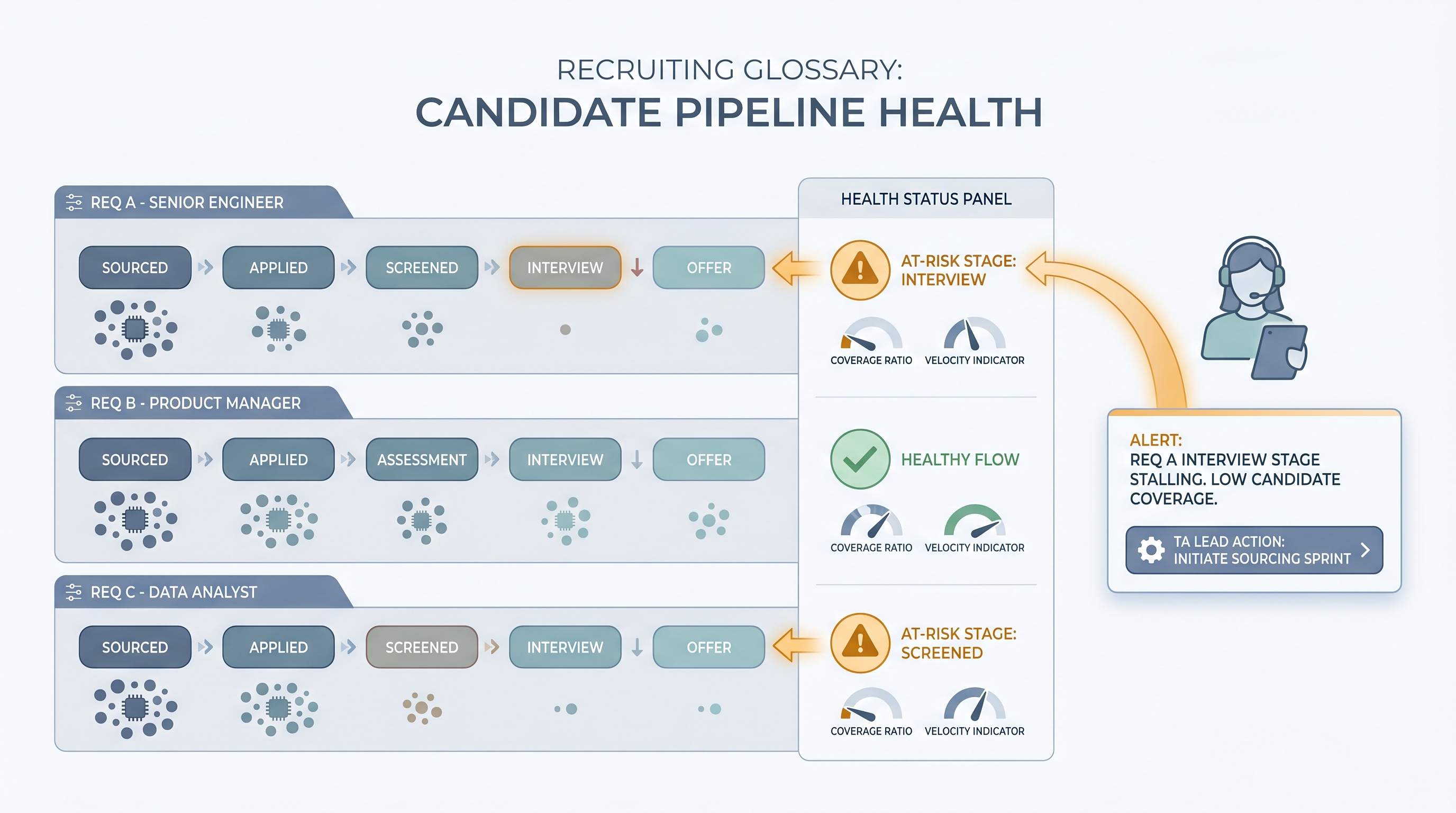
A measure of whether each open requisition has enough qualified candidates at the right stages to produce a hire on target. It combines stage coverage ratios, velocity indicators, and aging signals to tell TA teams where pipelines are at risk before they stall.
Michal Juhas · Last reviewed June 14, 2026
What is candidate pipeline health?
Candidate pipeline health describes whether each open req has enough qualified candidates at each stage to hit the hiring target without an emergency restart. A single metric (total candidates in the ATS) tells you very little; what matters is the distribution across stages, how long candidates are sitting idle, and whether new profiles are entering fast enough to replace expected drop-off. Recruiters who monitor health by stage catch sourcing gaps and bottlenecks weeks before they become missed start dates.
In practice
- A TA lead opens a weekly digest from an ATS-to-Slack automation that flags three reqs as amber: no new sourced profiles in 10 days, one candidate aging past the 7-day phone screen SLA. She assigns a sourcing sprint before the hiring managers notice anything is wrong.
- A recruiter reports pipeline health to the hiring manager as a three-column table: stage, count, and days-in-stage. The conversation shifts from "where are we" to "what do you need from me to move these two forward this week?"
- A sourcing team tracks a "funnel health score" for each req, calculated from response rate trends and stage coverage ratios, updated daily from ATS exports. Red scores get a team triage call; green scores get a check-in every Friday.
Quick read, then how hiring teams use it
This is for recruiters, sourcers, TA leads, and hiring managers who need to agree on what a healthy pipeline looks like before a req goes sideways. Skim the first section to align on vocabulary. Use the second when you are building a monitoring workflow or a hiring manager review cadence.
Plain-language summary
- What it means for you: If you only check whether candidates exist in the ATS, you will miss the moment when a req goes from "fine" to "crisis." Pipeline health is the early warning system.
- How you would use it: Check stage counts and time-in-stage for each req at least twice a week. Flag any req where no new profiles entered in the last five days or where any candidate has sat in a stage longer than your SLA.
- How to get started: Pick your three highest-priority open reqs. Draw the current stage distribution on paper. For each stage, ask: if the next two candidates drop out, do I have enough behind them to still fill the role on time?
- When it is a good time: Always, but especially the week a req opens (to verify the sourcing plan is realistic) and two weeks before the target start date (to confirm you have an offer-ready candidate).
When you are running live reqs and tools
- What it means for you: At scale, manual stage checks break down. Pipeline health needs to be automated so TA leads see risk across 20 or 50 open reqs without reading every ATS record.
- When it is a good time: When you standardize your ATS stage naming so health calculations work consistently, when you build a weekly TA ops report, and when hiring manager satisfaction with TA becomes a target.
- How to use it: Wire your ATS to a recruiting webhooks flow that updates a health dashboard or Slack alert when stage counts cross thresholds. Combine with pipeline coverage reporting for the exec view.
- How to get started: Define health thresholds for your three most common role types (individual contributor, manager, technical specialist). Encode them in a scoring rule. Run the rule against last month's closed reqs to validate it would have caught the ones that slipped.
- What to watch for: Health scores that look fine because candidates are sitting in an early stage. Stage coverage is meaningless if no one is advancing. Always check both count and velocity together.
Where we talk about this
On AI with Michal live sessions, pipeline health comes up in the AI in recruiting and sourcing automation tracks, where we build weekly reporting flows and discuss what the health thresholds should be for different role types. Start at the AI Recruiting Accelerator and bring your current req list and ATS stage structure.
Around the web (opinions and rabbit holes)
Third-party creators move fast. Treat these as starting points, not endorsements, and double-check anything before wiring candidate data.
YouTube
- How to Manage Your Recruiting Pipeline (LinkedIn Talent Solutions) covers stage management fundamentals for in-house teams.
- Recruiting Metrics That Matter (SHRM) walks through conversion-based pipeline measurement with real examples.
- How do you track pipeline health across 30+ reqs? in r/recruiting is a practical thread on dashboards and manual workarounds practitioners actually use.
- What metrics do you use to know a req is in trouble? in r/recruiting collects early-warning signals from experienced recruiters.
Quora
- What is the best way to track recruiting pipeline health? gathers perspectives from in-house TA and agency recruiters with different tooling contexts.
Related on this site
- Glossary: Sourcing funnel metrics, Pipeline coverage reporting, Recruiting stage SLA metrics, Hiring manager funnel review, Workflow automation
- Blog: AI sourcing tools for recruiters
- Guides: Sourcers
- Live cohort: AI Sourcing Lab
- Membership: Become a member