Recruitment AI tools
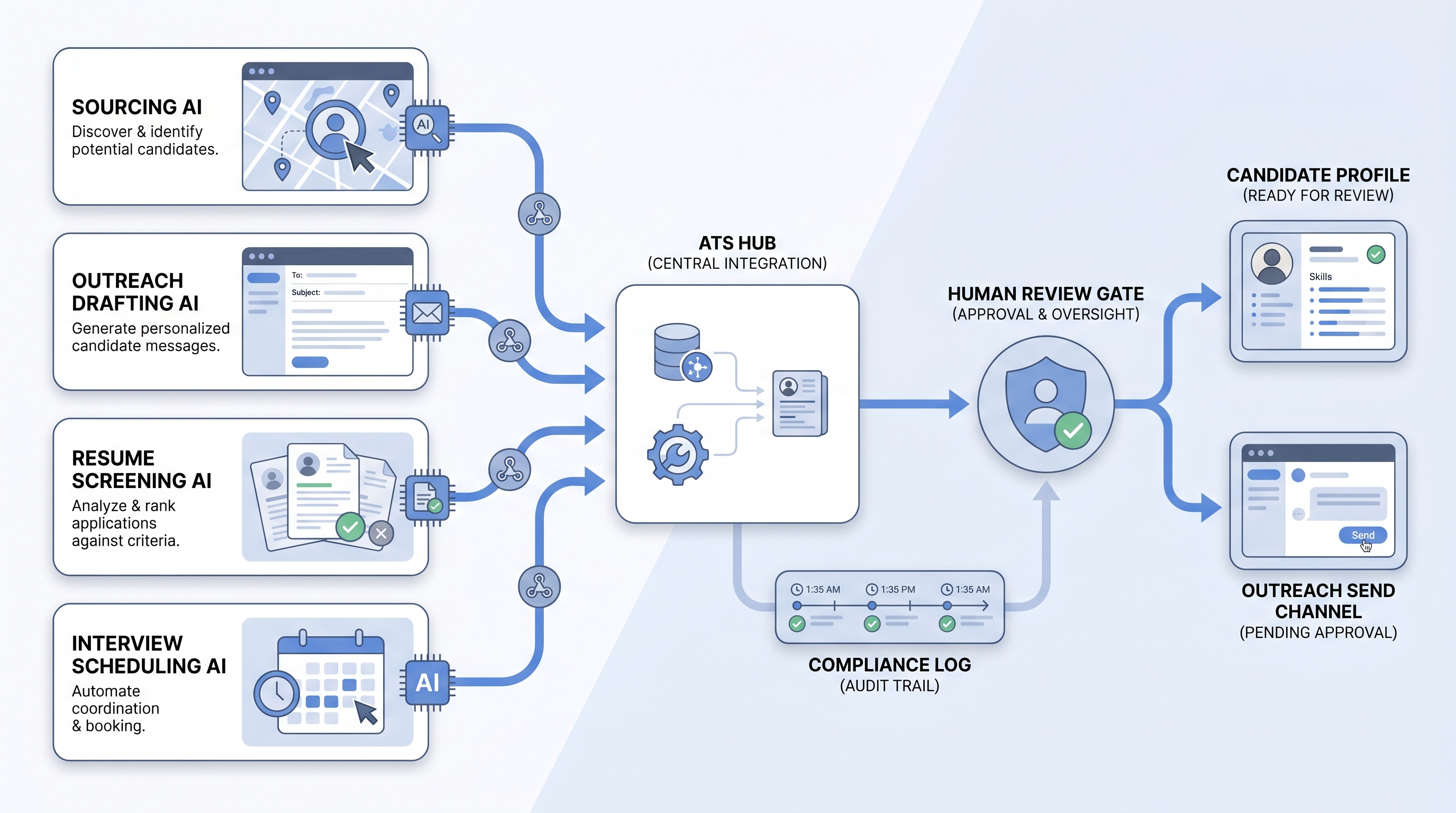
The individual software tools that apply AI to a specific task in the hiring process: finding candidates, drafting outreach, screening resumes, scheduling interviews, or summarizing notes. Unlike a full platform, a recruitment AI tool solves one problem well and connects to the ATS through an integration.
Michal Juhas · Last reviewed May 9, 2026
What are recruitment AI tools?
Recruitment AI tools are the individual, task-specific software products that apply AI to one part of the hiring process: finding passive candidates, personalizing outreach, screening resumes, scheduling interviews, or summarizing interview notes. The word "tools" signals something different from a full platform: a recruitment AI tool solves one problem well and connects to the rest of the hiring stack through an integration, rather than replacing it.
That distinction matters when you are deciding how to build a stack. A single AI sourcing tool that surfaces ten qualified candidates per day is immediately useful and replaceable if something better arrives. A full-platform purchase commits candidate data, team training, and integration work to one vendor across every hiring stage.
In practice
- A sourcer at a 300-person company uses three separate tools: one that surfaces passive candidates via semantic search, one that drafts personalized first messages from a profile card, and one that books screens through a self-book link. None of them talk to each other directly; the ATS is the record of truth. "I pick the tool that does one thing well," she says. "If sourcing breaks, I swap it. I don't want the drafting tool holding my candidate database hostage."
- A TA ops lead evaluating a new AI screening tool runs a four-week parallel test: the AI tool screens one hundred applications in the same time the recruiter screens twenty manually, with similar shortlist quality on high-volume roles. On specialist roles, the recruiter's shortlist is notably better. The team limits the AI tool to high-volume reqs above fifty applicants.
- In vendor calls, the phrase "recruitment AI tools" comes up when TA teams want to talk about specific capabilities (what does the sourcing step actually do?) rather than the software category label. It is a narrower, more task-level conversation than "what platform should we buy."
Quick read, then how hiring teams use it
This is for recruiters, sourcers, TA leaders, and HR partners who need shared vocabulary when evaluating a specific tool, not the full platform landscape. Skim the first section when you need a fast shared picture. Use the second when you are deciding which tools to add to your stack and how to connect them.
Plain-language summary
- What it means for you: Recruitment AI tools are specific software products that do one AI-assisted hiring job well, like finding passive candidates, drafting outreach, or scoring resumes, so recruiters spend time on the judgment calls the tool cannot make.
- How you would use it: Identify the task costing the most recruiter hours per week, then pilot one tool against that task with real open roles before adding more.
- How to get started: Pick one bottleneck, run a two-week trial with your actual job types, and score output quality after a human review step. Only expand the stack after the first tool is trusted and used consistently.
- When it is a good time: When the same recruiter task happens at high volume (fifty or more repeats per week), when the bottleneck is measurable, and when you have a named owner for the integration and the compliance check.
When you are running live reqs and tools
- What it means for you: Recruitment AI tools change state in systems: rankings in a screening queue, outreach messages queued to send, stage moves in the ATS. That is a different risk profile from text in a chat window, and it requires an audit trail for every consequential output.
- When it is a good time: After prompts or scoring rubrics are stable and reviewed, when the ATS integration is production-confirmed (not roadmap), and when a human-in-the-loop gate exists before any candidate-facing action or stage change.
- How to use it: Match tool category to task: sourcing AI for passive candidate discovery, outreach drafting for personalized first-touch, screening AI for high-volume CV review, scheduling tools for interview booking. Log model version and reviewer name for every AI-assisted decision. See workflow automation for integration patterns that stay reliable across ATS updates.
- How to get started: Map the integration (which fields the tool reads and writes) before configuring it. Confirm the DPA covers candidate PII from any enrichment source. Run a parallel test against your baseline before decommissioning the manual step.
- What to watch for: Silent failures when ATS schemas change, prompt or rubric drift after vendor updates, adverse impact in screening output when job-type mix shifts, and AI output the team stops trusting and routes around manually. Instrument usage every thirty days, not just at launch.
Where we talk about this
On AI with Michal live sessions, recruitment AI tools come up as a practical decision layer inside both tracks. The AI in recruiting block covers how to evaluate specific tools against a hiring bottleneck, what compliance questions to ask before a pilot, and how to wire a human review gate before AI outputs affect candidates. The sourcing automation block goes deeper on API integrations, webhook reliability, and GDPR data flows for AI-assisted sourcing tools. If you want the live room conversation with practitioners comparing notes on real tools, start at Sourcing Lab and bring your current stack.
Around the web (opinions and rabbit holes)
Third-party creators move fast. Treat these as starting points, not endorsements, and double-check anything before you wire candidate data to a new tool.
YouTube
- Search "AI sourcing tool demo" to watch practitioner walkthroughs. Watch for the review step: any demo where AI output flows to candidates without a visible human approval is showing you a risk, not a feature.
- Search "AI resume screening bias" for researcher and practitioner videos on adverse impact in algorithmic screening, a more grounded perspective than vendor marketing on the compliance side.
- Search "build vs buy AI recruiting stack" for TA ops content on assembling point tools versus buying a full platform, useful context before your next vendor negotiation.
- Search "AI recruiting tools worth it" in r/recruiting and r/TalentAcquisition for post-deployment views you will not find in case studies.
- Does anyone use AI for sourcing? in r/recruiting is where practitioners share which specific tools held up after the demo and which were quietly abandoned.
- Search "ATS integration AI tool broke" in r/TalentAcquisition for the failure stories that inform better integration planning before you commit.
Quora
- What AI tools actually help in recruiting? collects practitioner answers on which tools held up in production (quality varies; vendor perspectives appear frequently, read critically).
Point tool versus platform
| Dimension | Point tool | Full AI platform |
|---|---|---|
| Time to deploy | Days to weeks | Weeks to months |
| Integration control | You own the ATS wiring | Vendor owns (when stable) |
| Swap cost | Low; replace one tool | High; candidate data lives in platform |
| Bias audit surface | Contained to one task | Harder when AI spans all stages |
| Cost at low volume | Pay per tool | Per-seat pricing regardless of use |
Related on this site
- Glossary: Recruitment AI software, AI recruiting tools, AI recruitment platform, AI hiring tools, Adverse impact, Human-in-the-loop (HITL), Semantic search, Workflow automation
- Blog: AI sourcing tools for recruiters
- Guides: Sourcers
- Live cohort: Sourcing Lab
- Membership: Become a member
- Course: Starting with AI: foundations in recruiting