Top 10 recruiting tools
A shortlist of tools covering the main phases of a hiring workflow: applicant tracking, sourcing, contact enrichment, outreach, scheduling, assessment, video interviewing, analytics, onboarding, and compliance monitoring. No single ranked list fits every team; building your own top ten means matching tool categories to workflow gaps, ATS integrations, and compliance requirements.
Michal Juhas · Last reviewed May 15, 2026
What are the top 10 recruiting tools?
The phrase describes a shortlist of tools covering the main phases of a hiring workflow: applicant tracking, sourcing, contact enrichment, outreach, scheduling, skills assessment, video interviewing, analytics, onboarding, and compliance monitoring. No published ranking fits every team, because the right ten depend on team size, ATS integrations, compliance jurisdiction, and whether the primary bottleneck is finding candidates or evaluating them.
The ATS is always the core. Every other tool in the stack should write back to it so candidate data stays in one auditable record.
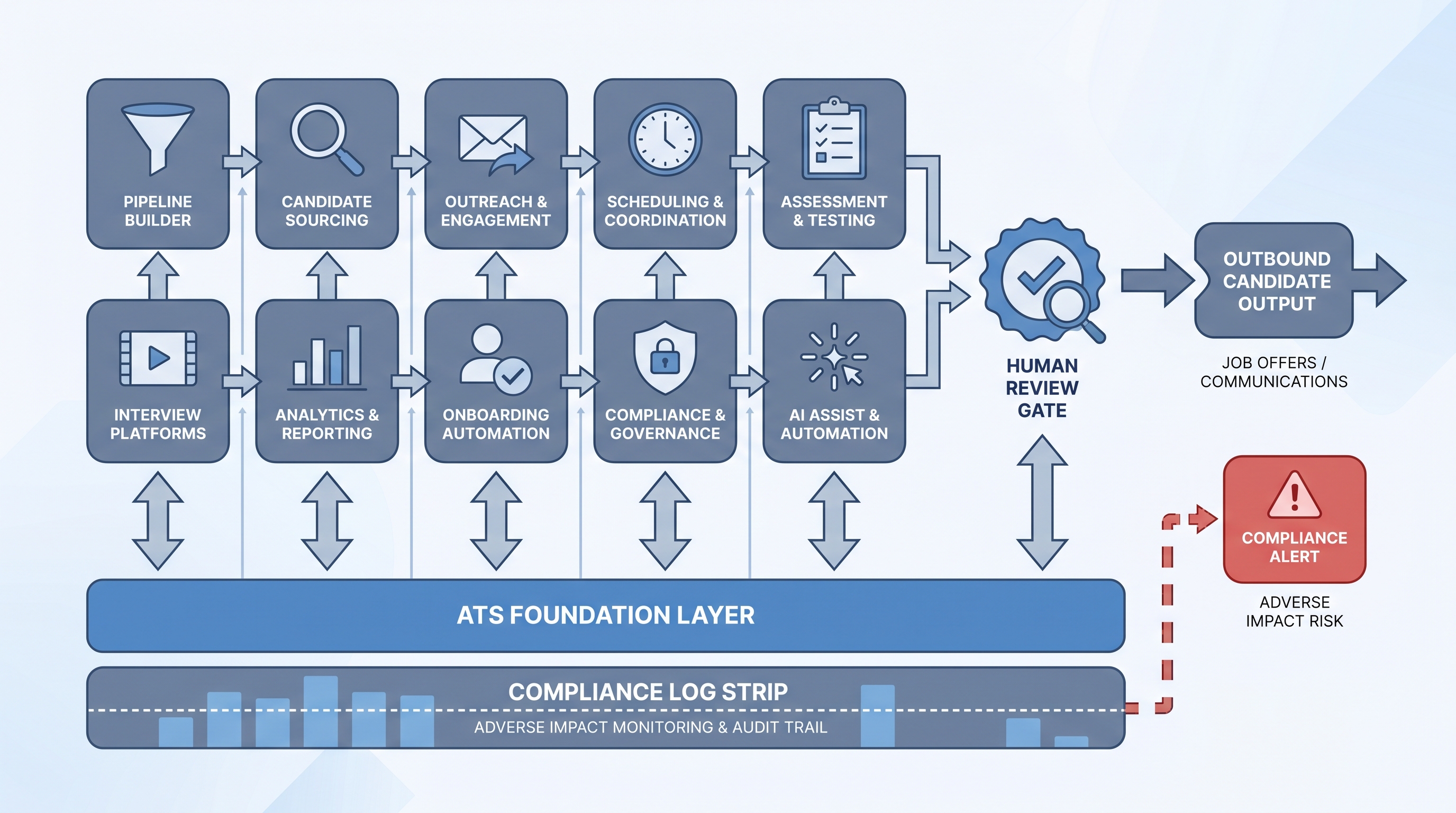
In practice
- A TA manager at a 300-person software company described her "top 10" as an ATS for pipeline routing, LinkedIn Recruiter for sourcing, a contact enrichment provider, an outreach sequencer, Calendly for scheduling, a skills assessment platform, an async video screen tool, a funnel analytics layer, an HRIS-connected onboarding tool, and a GDPR audit register owned by legal. That list reflects her workflow gaps and vendor contracts, not any industry ranking.
- Practitioners in TA communities consistently name the ATS integration question as the first filter. A sourcing tool that does not write candidate records back to the ATS creates a duplicate-record problem that compounds with every new req. The tool debate is almost always secondary to the integration architecture debate.
- An agency recruiter building a lean stack noted that her "top 10" included no traditional ATS. Her CRM served as the pipeline hub, Boolean search covered sourcing, and fee agreement templates handled compliance. The categories are the same; the products filling them are entirely different.
Quick read, then how hiring teams use it
This is for recruiters, sourcers, TA leaders, and HR partners who need a shared vocabulary for vendor evaluations, stack audits, and hiring manager conversations. Skim the first section for the shared picture. Use the second when you are auditing or building your end-to-end stack.
Plain-language summary
- What it means for you: Your "top 10 recruiting tools" is a set of tool categories, not a specific product list. Getting it right means knowing which categories you actually need and which ones your ATS can already handle natively.
- How you would use it: Map your current hiring process in two columns: where candidates come in, and where they are evaluated. Gaps in either column show which tool categories are missing or broken.
- How to get started: Run a one-page stack audit. List every tool your team uses, who owns it, whether it has a signed DPA, and whether it syncs to the ATS. Fix the gaps before buying anything new.
- When it is a good time: Before a major hiring campaign, when inconsistent evaluation is producing unpredictable quality, or when legal asks for a documented data register covering candidate data.
When you are running live reqs and tools
- What it means for you: A ten-tool stack is a ten-vendor data surface. Every tool that touches a candidate profile adds a DPA obligation, a retention window, and a deletion mechanism to manage under GDPR or equivalent regulation.
- When it is a good time: Before enabling AI features on any tool in the stack. Recruitment-side AI (matching, outreach drafting) and selection-side AI (assessment scoring, video analysis) each need a bias audit checklist, a human review gate, and a model version log before running on live candidates.
- How to use it: Define integration requirements before vendor demos. Confirm ATS write-back, DPA, data residency, and bias audit availability for every shortlisted tool. Pilot on one role before rolling out at volume.
- How to get started: Use the ten-category framework as a checklist. Assign an owner per category, a renewal date, and a DPA status. Share the register with HR, legal, and IT before the next contract cycle.
- What to watch for: Vendors bundling new AI scoring features in standard releases without opt-in, assessment results stored indefinitely with no deletion mechanism, enrichment data shared back to vendor databases without candidate consent, and scheduling tools that send calendar events without logging them in the ATS.
Where we talk about this
On AI with Michal live sessions, both sourcing-tool and evaluation-tool decisions come up together. The sourcing automation track covers the recruitment side: outreach tools, Boolean and semantic search, ATS integration, and where automation breaks under load. The AI in recruiting track covers the selection side: scorecard design, AI scoring features, and how to review them before deploying in a live search. If you want the full stack conversation in one room, start at Sourcing Lab and bring your current tool list and your biggest integration pain point.
Around the web (opinions and rabbit holes)
Third-party creators move fast and tooling changes frequently. Treat these as starting points, not endorsements, and check anything before connecting candidate data to a new system.
YouTube
- Search "best recruiting tools for recruiters" on YouTube filtered by the last six months for practitioner walkthroughs. The most useful videos show an actual workflow rather than a product tour.
- Search "recruiting stack setup" or "ATS integration recruiting" for how-to videos on connecting tools and where data falls out between systems when integration is missing.
- Search "AI recruiting tools review" for practitioner comparisons of AI-augmented sourcing, screening, and outreach tools from people who have used them in production.
- r/recruiting has recurring threads asking which tools people actually use, what they replaced, and where vendor demos did not match production reality.
- r/TalentAcquisition covers TA leader conversations on stack consolidation, budget pressure, and which tools survive real volume.
- r/RecruitmentAgencies for agency-specific tool questions where CRM, fee tracking, and right-to-represent features matter as much as sourcing.
Quora
- What are the best tools for recruiters? collects practitioner answers across different team sizes and hiring volumes, showing how context changes the top-ten list.
Top 10 recruiting tools by category
| Category | Primary job | Key integration check | AI upgrade watch |
|---|---|---|---|
| Applicant tracking (ATS) | Pipeline routing and compliance anchor | All other tools write back here | AI matching layer |
| Sourcing platform | Find and surface candidate profiles | ATS sync or structured export | Semantic search alongside Boolean |
| Contact enrichment | Add verified emails and phone numbers | GDPR data provenance and deletion | Waterfall enrichment with source logs |
| Outreach sequencer | Personalized first contact at scale | ATS stage trigger and reply logging | AI draft with mandatory review gate |
| Scheduling tool | Remove calendar back-and-forth | Calendar event logged in ATS | AI self-book or negotiation |
| Skills assessment | Structured evaluation before interviews | ATS invite and score sync | AI scoring with bias audit |
| Video interview platform | Async or live screen with rubric | ATS stage write-back | AI transcript and summary |
| Analytics and reporting | Funnel conversion and source quality | ATS data export and refresh cadence | Anomaly flags and bottleneck alerts |
| Onboarding tool | Post-offer coordination across teams | HRIS and ATS handoff | AI checklist and task routing |
| Compliance monitor | Adverse impact and data rights | Deletion log and DPA register | Bias audit reports by demographic |
Related on this site
- Glossary: Applicant tracking software, Hiring tools, AI recruiting tools, Boolean search, Outbound talent sourcing, Candidate assessment tools, Scorecard, ATS API integration, Adverse impact, AI bias audit, Human-in-the-loop (HITL), GDPR first-touch outreach, Recruitment software comparison
- Blog: AI sourcing tools for recruiters
- Guides: Sourcers
- Live cohort: Sourcing Lab
- Course: Starting with AI: foundations in recruiting
- Membership: Become a member