AI employment
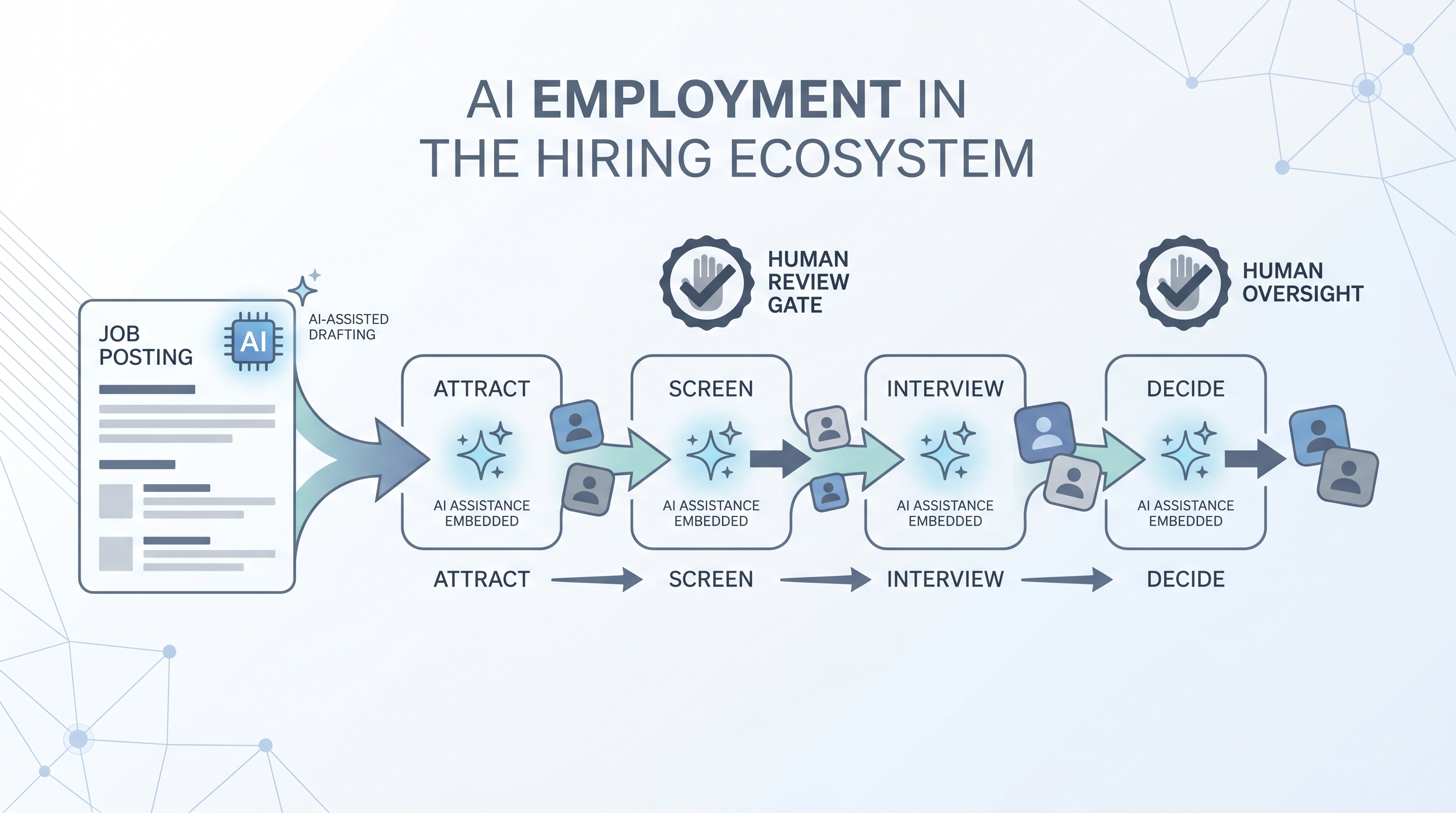
The application of artificial intelligence across the full employment lifecycle: writing job posts, sourcing and screening candidates, evaluating fit, extending offers, and supporting onboarding, with human review at each stage where decisions affect people.
Michal Juhas · Last reviewed May 3, 2026
What is AI employment?
AI employment is the use of artificial intelligence tools and automated systems across the full employment process: writing and posting jobs, sourcing candidates, parsing applications, screening CVs, scheduling interviews, supporting hiring decisions, and onboarding. It is not one product or one stage. It is the sum of every AI-assisted step between a job requisition opening and a new hire starting.
In practice
- A recruiter using an AI sourcing tool to write outreach copy and then reviewing each message before it sends is using AI in the employment process with a human gate in place.
- A TA lead who asks why their ATS flagged a candidate as low fit and cannot get a plain-language explanation from the vendor is experiencing one of the accountability gaps common in AI employment today.
- A people ops team that ran an AI screening tool for six months without auditing pass rates by demographic group is the scenario most employment lawyers now flag as a liability exposure.
Quick read, then how hiring teams use it
This is for recruiters, sourcers, TA leads, and HRBPs who need a shared vocabulary for tool decisions, compliance reviews, and conversations with hiring managers. Skim the first section for a fast shared picture. Use the second when you are evaluating a tool, running live reqs, or fielding legal questions.
Plain-language summary
- What it means for you: AI employment means AI handles repetitive text and data tasks at each hiring stage, from drafting job posts to suggesting scorecard notes, so you can spend recruiter time on decisions and relationships that need human judgment.
- How you would use it: Pick one stage that costs the most time per week, find the AI tool category that fits it, and pilot it for four to six weeks with a human review gate before any output moves a candidate forward.
- How to get started: List your current hiring stages and note which ones rely on copy-paste or retyping the same information. Those are your best AI employment starting points.
- When it is a good time: After your hiring process is documented and stable, not while the workflow itself is still changing every month.
When you are running live reqs and tools
- What it means for you: Every AI tool in your employment stack that touches candidate data is a data processing decision with legal implications, not just a productivity upgrade.
- When it is a good time: Before you add any AI tool to a screening or scoring step: that is where bias, GDPR automated-decision rules, and data residency risks converge.
- How to use it: Map which AI output feeds which hiring decision. Confirm where candidate PII lands. Log model versions and prompt hashes for any AI suggestion that influenced who advanced. Add a human-in-the-loop review gate before outbound messages and before reject decisions.
- How to get started: For any AI tool already in use, ask the vendor: which model version is running, where does output get stored, and has an adverse impact check been run on the scoring logic?
- What to watch for: Vendors that fold new AI features into existing contracts without updating the DPA. Scoring tools that were calibrated on one job family and are now used across all of them. Reject decisions that were never reviewed by a human after initial setup.
Where we talk about this
On AI with Michal live sessions, AI employment is the backdrop for both tracks. AI in recruiting Live Build sessions cover the tool landscape, where human gates belong, and how to explain AI decisions to a skeptical hiring manager. Sourcing automation sessions dig into the integration layer: how AI tools hand off data, what breaks when a vendor changes an API, and which compliance questions to answer before you scale. Bring your current stack and your biggest accountability question to Sourcing Lab for a room-tested conversation.
Around the web (opinions and rabbit holes)
Third-party creators move fast on this topic. Treat these as starting points, not endorsements, and verify compliance postures directly with vendors.
YouTube
- How companies use AI in hiring and employment covers practitioner walkthroughs of how AI tools are deployed across the employment funnel.
- AI bias in hiring explained surfaces researchers and practitioners discussing where bias enters AI employment tools and how audits work.
- GDPR and AI in employment decisions covers the legal context for automated decision-making in European hiring contexts.
- AI tools in recruiting - what actually works? in r/recruiting separates hype from tools recruiters use in production today.
- AI bias in candidate screening in r/recruiting surfaces real accountability questions teams are navigating.
- GDPR and automated screening tools in r/recruiting collects practitioner questions about lawful basis and opt-out rights.
Quora
- How is artificial intelligence used in employment? collects a range of practitioner and expert answers on AI across the employment lifecycle.
AI employment by stage
| Employment stage | Common AI use | Key risk |
|---|---|---|
| Job posting | Draft and optimize job descriptions | Generic output lacking role context |
| Sourcing | Find and enrich candidate profiles | Candidate data enrichment GDPR exposure |
| Screening | Parse CVs, score applications | Adverse impact on protected groups |
| Interviewing | Transcription, scorecard suggestions | Hallucination in meeting notes |
| Decision | Ranking, offer fit scoring | GDPR Article 22 automated decision rules |
| Onboarding | FAQ bots, document generation | Data residency and access control |
Related on this site
- Glossary: AI bias audit, Adverse impact, Human-in-the-loop, Recruiter AI, Applicant tracking software, Hiring tools, AI-native, Workflow automation
- Blog: AI sourcing tools for recruiters
- Guides: Sourcers
- Workshops: Sourcing Lab
- Membership: Become a member
- Courses: Starting with AI: the foundations in recruiting