Interview scheduling automation
Software that handles the calendar coordination step of hiring, from self-service booking links and panel-availability solvers to AI-driven conversational schedulers, so recruiters stop running email back-and-forth between candidates, interviewers, and the ATS.
Michal Juhas · Last reviewed May 28, 2026
What is interview scheduling automation?
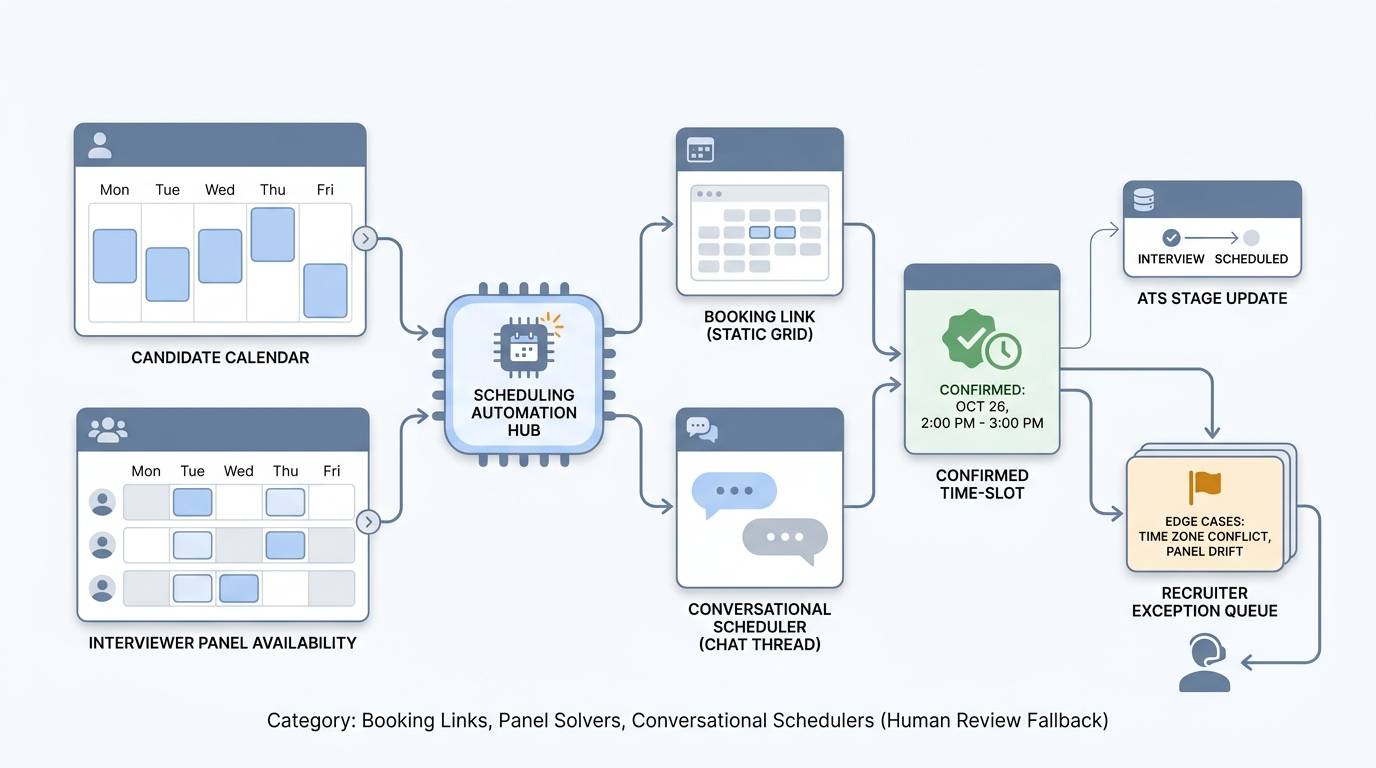
Interview scheduling automation is software that handles the calendar choreography of hiring, so recruiters stop running email between candidates, interviewers, and the ATS. It covers a range of tools, from a simple self-service booking link to a conversational AI scheduler that resolves panel overlaps and writes stage updates back into the applicant tracking system.
The point is rarely the technology itself. It is to move the highest-volume, lowest-strategic part of the recruiter day, calendar coordination, off the recruiter's plate so they can spend that time on intake conversations, interview prep, and candidate relationships.
In practice
- A sourcer running 25 first-round screens a week shifts from spending half a day on email coordination to reviewing a short exception queue, often fewer than three items per week, once a booking layer is wired in.
- A TA ops lead might say "the scheduler can't see Anita's calendar after she moved tenants" when a panel keeps proposing a senior interviewer who quietly stopped accepting bookings, even if the recruiter only notices because the hiring manager flags an empty Tuesday.
- Hiring managers describe the same shift in candidate-experience language: "candidates are getting confirmations within minutes now," which is the visible surface of a backend change nobody on the panel touched directly.
Quick read, then how hiring teams use it
This is for recruiters, sourcers, TA ops, and HR partners who want to move scheduling off the recruiter's plate without degrading candidate experience or losing track of who agreed to what. Skim the first section for the fast picture. Use the second when you are choosing a tool, designing the integration, or troubleshooting what breaks in production.
Plain-language summary
- What it means for you: Instead of emailing back and forth to find a time, software reads everyone's calendars and either shows the candidate a few open slots or runs a short conversational exchange. The booking, the calendar invite, and the ATS update all happen automatically. You review exceptions.
- How you would use it: Wire the tool to fire after a candidate replies positively to outreach or advances past a stage. Decide the rules: who can be booked, what time zones are in scope, how long each interview type runs. Then watch the exception queue daily for the first month.
- How to get started: Pick one high-volume pipeline stage where scheduling repeats more than 10 times a week. Test the tool against your own inbox first. Roll out on that one stage for four weeks before expanding to others.
- When it is a good time: When your team spends more than two hours per week on calendar coordination for a specific role type and the interview structure is standardized enough that the tool will not need to ask the candidate unusual questions.
When you are running live reqs and tools
- What it means for you: Interview scheduling automation changes state in your stack: stages move, interviewers get booked, calendar invites land, ATS records update, candidate emails go out. Every failure ripples across all of those systems, so the bar for "ready to ship" is higher than for a tool that only drafts text.
- When it is a good time: After you have verified calendar sync reliability under load, confirmed GDPR documentation and DPAs are in place, scoped OAuth tokens with IT, and tested edge cases in a sandboxed inbox (mixed time zones, declined invites, last-minute reschedules) before any candidate sees the tool.
- How to use it: Pick one form factor per stage. Static booking links (Calendly, GoodTime, ATS native) for transactional screens. Panel-availability solvers for onsite or panel days where you need to compute overlap across many interviewers. Conversational scheduling for high-volume top of funnel where the natural-language feel matters. Mixing patterns per stage is normal; standardising on one tool for everything usually leaks edge cases somewhere.
- How to get started: Map your current pipeline. Find the stage with the highest scheduling load. Test one tool against your own inboxes for two to four weeks. Wire ATS write-back. Roll out on that single stage. Expand only after exception rates stay under 10% for a month.
- What to watch for: Calendar sync lag creating false availability, panel-pool data drifting silently, candidate-facing emails coming from a from-address recipients don't recognise, time-zone mismatches that book the wrong slot quietly, and vendors that keep full conversation transcripts for model improvement by default. Log every ATS write the tool makes so audits answer "what changed and when" in one screenshot.
Where we talk about this
On AI with Michal live sessions, interview scheduling automation comes up almost every time a team audits their pipeline for automation candidates. It usually ranks in the top three by hours saved relative to strategic risk, which is why it is one of the first stages we automate together. In the AI Recruiting Accelerator track we connect the scheduling layer to the broader outreach-to-screen handoff, so the next stage receives clean data. Members of the AI Sourcing Lab share live setups for both single-recruiter and high-volume team configurations, so you can compare a calm one-req-at-a-time setup with a 50-screens-a-week one before standardising.
Around the web (opinions and rabbit holes)
Third-party creators move fast. Treat these as starting points, not endorsements, and double-check anything before you wire candidate data to a new tool.
YouTube
- Interview Scheduling Automation Walkthroughs (search) collects practitioner demos of booking-link tools, panel solvers, and ATS-native schedulers in real recruiter setups.
- GoodTime, Calendly, and ATS Scheduling Comparisons (search) walks through the practical differences between the main tool families recruiters evaluate.
- Recruiter Workflow Automation End to End (search) shows scheduling automation in the wider context of outreach-to-screen handoffs.
- What scheduling tool is actually saving you time? in r/recruiting is full of frank practitioner answers about what works at different team sizes.
- Panel interview scheduling for engineering hiring in r/Talent_Acquisition covers the harder solver-style problems.
- GDPR and candidate scheduling tools in r/gdpr covers the privacy questions TA teams rarely surface before deployment.
Quora
- What is the best AI tool for scheduling interviews? collects recommendations and warnings from TA practitioners. Quality varies, so read critically.
Booking links vs panel solvers vs conversational schedulers
| Dimension | Self-service booking link | Panel-availability solver | Conversational scheduler |
|---|---|---|---|
| Candidate input method | Click a slot in a grid | Click a slot computed across panel | Natural-language reply |
| Best fit | High-volume screens, intro calls | Onsites, multi-panelist rounds | Top-of-funnel, candidate-experience sensitive |
| Setup complexity | Low | Medium | Medium to high |
| GDPR data footprint | Minimal (slot selection only) | Medium (panel availability cached) | Higher (stores conversation thread) |
| Failure surface | Static link errors | Stale panel data, wrong solver hits | Misread intent, parser confidence drops |
Related on this site
- Glossary: Conversational scheduling, Chatbot screening, One-way video interview, Workflow automation, Candidate experience, Applicant tracking system, GDPR for recruiting data
- Blog: AI sourcing tools for recruiters
- Guides: Sourcers
- Live cohort: Sourcing Lab
- Self-paced: Starting with AI: the foundations in recruiting
- Membership: Become a member
- Lab: AI Sourcing Lab for live build sessions on scheduling and outreach automation