Recruitment tools
The full set of platforms and features used across the hiring lifecycle, from job posting and sourcing through screening, interviewing, scheduling, offer management, and analytics.
Michal Juhas · Last reviewed May 9, 2026
What are recruitment tools?
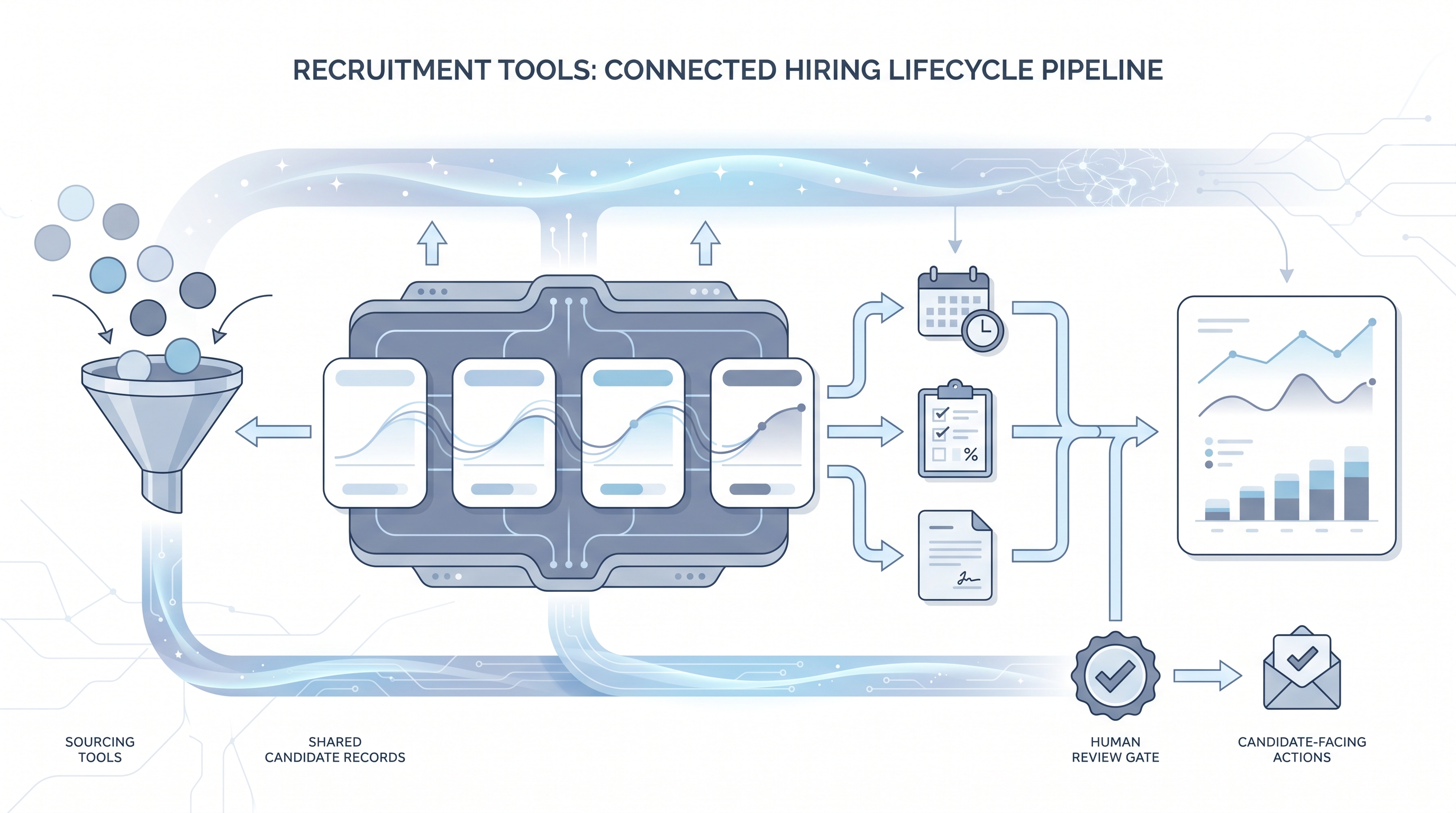
Recruitment tools are the platforms and features that hiring teams use to move candidates from unknown to hired. Unlike a single software category, recruitment tools span the entire hiring lifecycle: top-of-funnel distribution, passive candidate sourcing, pipeline tracking in an applicant tracking system, structured assessment, interview scheduling, offer management, and analytics that measure how the whole process performs.
The term is often used interchangeably with recruiting software or hiring tools, but the broader label is more accurate. Most TA teams run a stack of connected tools rather than one monolithic platform, and the quality of that connection (how reliably data moves between sourcing tool, ATS, and assessment platform) determines whether the investment shows up in outcomes or just adds logins.
In practice
- A TA lead reviewing the quarterly tool stack says "the sourcing tool and the ATS are not syncing correctly, so sourced candidates show up as inbound in the funnel report," meaning a broken integration is hiding where qualified candidates actually came from and making source-of-hire reporting unreliable.
- A recruiter onboarding a new sequencing tool asks "does this go through the ATS or directly to the candidate?" before configuring any outreach, because which path the message takes determines the audit trail, the GDPR lawful basis, and whether the conversation history lands in the system of record.
- An HRBP reviewing a vendor contract says "I need the DPA before we add this to the approved stack," meaning data protection agreement review is now standard practice before any tool that touches candidate data gets credentials.
Quick read, then how hiring teams use it
This is for recruiters, sourcers, TA leads, and HRBPs who select, integrate, or audit recruitment tools and need shared vocabulary for vendor conversations, stack decisions, and compliance reviews. Skim the first section for a quick shared picture. Use the second when you are adding a tool, replacing one that is not working, or building a case for tool investment.
Plain-language summary
- What it means for you: Recruitment tools are anything your team uses to post jobs, find candidates, move them through a pipeline, evaluate them fairly, schedule conversations, and measure how the whole process performs.
- How you would use it: Pick the stage that costs your team the most time each week and ask whether the tool covering that stage integrates cleanly with your ATS before looking at any other feature.
- How to get started: List every tool your team currently uses, map which candidate data each one holds, and check whether that data can be exported and deleted on request. That one-hour audit reveals integration gaps and compliance exposure before you buy anything new.
- When it is a good time: When time-to-fill is climbing, when sourced candidates are not appearing in your pipeline reporting, or when your team is maintaining three spreadsheets to bridge gaps that tool integrations should cover.
When you are running live reqs and tools
- What it means for you: Every recruitment tool your team uses is also a data processor. When you connect a sourcing tool, assessment platform, or scheduling tool to candidate records, each one becomes a link in your GDPR compliance chain, not just a productivity shortcut.
- When it is a good time: Before any tool goes into production use with real candidate data, check the DPA, confirm the server region, and name an internal owner for the vendor relationship. This takes less time before a contract than during a data subject access request.
- How to use it: Build a short tool inventory: name, category, ATS integration method, data residency, DPA location, and internal owner. Update it when you add or remove tools. Most compliance gaps in sourcing and assessment workflows come from tools that were added quickly and never formally reviewed.
- How to get started: Start with your ATS as the source of truth and map backward: which tools push data in, which tools pull data out, and which data never makes it back to the ATS at all. That last category is where audit trail gaps live.
- What to watch for: AI ranking or scoring features that affect candidate decisions without surfacing the factors behind the score. Outreach sequencers that can send at scale once configured, with no human review gate before first contact. Assessment tools that store results outside the ATS where they are hard to locate during a data deletion request.
Where we talk about this
On AI with Michal live sessions, recruitment tools come up across both tracks. AI in recruiting sessions cover tool evaluation criteria, where AI features add genuine leverage versus where they add opacity and compliance risk, and how to build a stack that a hiring manager can trust. Sourcing automation sessions show how sourcing and enrichment tools connect to ATS APIs, what breaks in production, and how to maintain data quality across a multi-vendor stack. Bring your current tool list and the workflow step causing the most friction to Sourcing Lab for a room-tested review.
Around the web (opinions and rabbit holes)
Third-party creators move fast on this topic. Treat these as starting points, not endorsements, and verify integration quality and data compliance postures directly with vendors before committing candidate data to any platform.
YouTube
- Recruitment software overview for talent acquisition teams covers category-by-category walkthroughs of how modern recruiting tool stacks are structured, useful for building a shared vocabulary before a tool evaluation.
- ATS integration and recruiting tool stack tutorial shows how sourcing, assessment, and scheduling tools connect to applicant tracking systems in practice, including common integration failure modes.
- AI recruitment tools demo and comparison pulls practitioner walkthroughs of AI-powered features across multiple vendors rather than solo marketing demos.
- What recruiting tools does your team actually use? in r/recruiting is a recurring comparison thread where practitioners share what held up in production and what disappointed after the trial.
- Recruiting tool stack recommendations in r/RecruitmentAgencies covers agency-specific stacks where sourcing tools, CRMs, and billing systems need to connect.
- ATS vs standalone recruiting tools in r/recruiting addresses when to use the ATS-native feature versus a best-of-breed specialist tool for sourcing, scheduling, or assessment.
Quora
- What are the best recruitment tools for talent acquisition? collects practitioner recommendations across company size and hiring context (read critically as tool quality and pricing change regularly).
Recruitment tools by stage
| Stage | Tool category | Key integration check |
|---|---|---|
| Job posting | Job board distribution | Boards included; cost per click vs flat fee |
| Sourcing | Database and enrichment tools | ATS push capability; verified email accuracy by region |
| Pipeline management | Applicant tracking system | API documentation; webhook reliability; audit log export |
| Screening | Assessment platforms | Score return to ATS record; group pass-rate reporting |
| Scheduling | Interview coordination | Calendar sync with all interviewer types; no-show handling |
| Offer management | Offer and e-sign tools | Offer data back to ATS; onboarding handoff method |
| Analytics | Reporting dashboards | Source-of-hire accuracy; time-to-fill and conversion by stage |
Related on this site
- Glossary: Applicant tracking software, Recruitment sourcing tools, AI recruiting tools, Hiring tools, Human-in-the-loop, Hallucination, AI bias audit, GDPR first-touch outreach, Talent acquisition metrics, Time to fill, Best recruitment tools
- Blog: AI sourcing tools for recruiters
- Guides: Sourcers
- Workshops: Sourcing Lab
- Membership: Become a member
- Course: Starting with AI: foundations in recruiting