Recruiting copilot
An AI assistant that sits beside a recruiter inside the daily workflow (ATS, inbox, LinkedIn, chat) to draft messages, summarize profiles, and suggest next steps, while the recruiter stays in control of every send and decision.
Michal Juhas · Last reviewed June 5, 2026
What is a recruiting copilot?
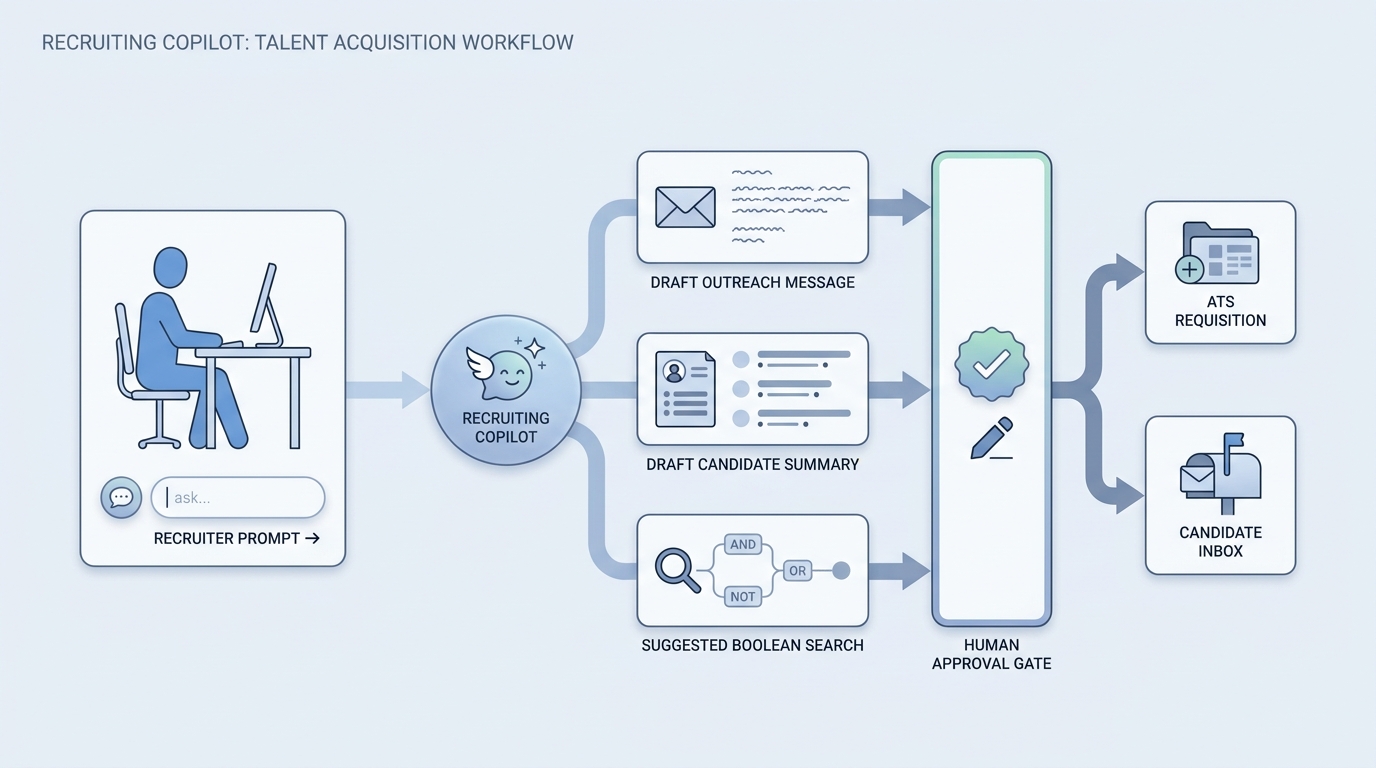
A recruiting copilot is an AI assistant that works next to a recruiter inside the tools they already use, like the ATS, inbox, LinkedIn, or a chat window. It drafts outreach, summarizes profiles and intake calls, suggests Boolean strings, and proposes next steps, but the recruiter approves, edits, or discards everything. The word "copilot" is the giveaway: it flies with you, it does not fly the plane.
In practice
- A recruiter pastes a long profile and asks the copilot for a three-line summary plus three things to verify on a call. Vendors brand this as an "AI assistant" or "copilot" inside the sourcing tool.
- A TA lead drops an intake recording into the assistant and gets a structured brief (must-haves, nice-to-haves, comp range) they clean up in two minutes instead of twenty.
- Someone in a debrief says "let the copilot draft the rejection" and a careful manager pushes back, because that is a decision and a tone call, not a drafting task.
Quick read, then how hiring teams use it
This is for recruiters, sourcers, TA, and HR partners who keep hearing "copilot" in vendor demos and want a shared, honest picture of what it does. Skim the first section for a fast mental model. Use the second when you are deciding how a copilot shows up in your ATS, sourcing stack, and candidate communications.
Plain-language summary
- What it means for you: A helper that sits next to you while you work and offers to do the typing and reading: a draft message, a profile summary, a suggested search. You always get the final say.
- How you would use it: You ask in plain language ("summarize this CV", "draft a friendly first message for this role"), read what comes back, fix it, and send it yourself.
- How to get started: Pick the one task you retype most this week. Try the copilot on that single task for a few days before you change anything else.
- When it is a good time: When the task is reading or drafting and a wrong first try costs seconds. Not when the task is judging, ranking, or rejecting people.
When you are running live reqs and tools
- What it means for you: A copilot accelerates preparation (summaries, drafts, search ideas) but does not change state in your systems on its own. The moment something writes to the ATS or sends to a candidate without your approval, you have crossed from copilot into workflow automation and the risk profile changes.
- When it is a good time: After you have a shared prompt library so drafts are consistent across the desk, and once you have agreed which candidate data the assistant may read.
- How to use it: Keep a human-in-the-loop send gate on everything candidate-facing. Use it to prepare, not to decide: scoring stays on a scorecard, and rejections stay human. Read AI sourcing tools for recruiters before you wire it to paid data vendors.
- How to get started: Run it on internal, reversible tasks first (summaries, intake briefs, ad rewrites). Add outreach drafts behind a review gate next. Only connect it to your ATS via API integration once the drafting quality is trusted.
- What to watch for: Invented employment details (a hallucination risk), drafts so generic you rewrite them anyway, candidate data flowing to a vendor nobody vetted, and "let the copilot decide" creep where a helper quietly starts making judgment calls.
Where we talk about this
On AI with Michal live sessions we keep the copilot line clear: in the AI in recruiting track we work on drafting, summarizing, and review habits that keep a human on every candidate-facing decision, and in the sourcing automation track we show exactly where a copilot ends and automation begins, including the send gate and the audit log. If you want to see real desks set this up, with their ATS and policy constraints, start at Sourcing Lab and bring your own workflow.
Around the web (opinions and rabbit holes)
Third-party creators move fast and "copilot" means different things to different vendors. Treat these as starting points, not endorsements, and never paste a stranger's prompt that moves candidate data without checking it.
YouTube
- Search "AI copilot for recruiters" for hands-on walkthroughs of assistants inside ATS and sourcing tools; watch how often the demo skips the review step (that is the part you must add back).
- Vendor channels for Microsoft 365 Copilot show the read-your-inbox pattern that recruiting copilots borrow; good for vocabulary before you compare options.
- r/recruiting regularly debates which AI assistants actually save time versus which create cleanup work; the skeptical threads are the useful ones.
- r/recruitinghell is where candidates vent about obviously AI-written outreach, a free reminder to edit every draft before you send it.
Quora
- Searches like "is AI going to replace recruiters" collect a wide range of practitioner answers (quality varies, so read critically and weigh the source).
Copilot versus agent versus automation
| Pattern | Who acts | Human gate | Best first use |
|---|---|---|---|
| Copilot | You, with suggestions | Every step | Summaries, drafts, search ideas |
| Agent | The AI, multi-step | Spot checks | Narrow, low-risk research |
| Automation | Triggers and APIs | Review queue | Stable, boring, repeated flows |
Related on this site
- Glossary: AI for recruiters, Recruiter AI, Microsoft Copilot in recruiting, AI outreach drafting, Human-in-the-loop (HITL), Workflow automation
- Blog: AI sourcing tools for recruiters, Boolean search vs AI sourcing
- Tools: ChatGPT, Claude
- Course: Starting with AI: the foundations in recruiting
- Live cohort: Sourcing Lab
- Membership: Become a member